Friday, 23 August 2013

How to move conversations to Primary,Social, Promotions in Gmail?

| Friday, August 23, 2013 | | Be first to comment!

In a previous article I shared news about the new Gmail inbox update [official video], and how to get it. In the new Gmail inbox all the mails are categorized under a maximum of five categories namely, Primary, Social, Promotions and Forums.

Because of automatic categorization it is quite likely to have your important newsletter or mails to get shifted under the category of less important mails. In such cases, you are required to move the mail or mails to the appropriate category.

How to move emails from one category to another?

  1. Log-in into your Gmail account.
  2. Switch to the tab were you have received any email that according to you belongs to another category.
  3. Click and hold that mail, and drag and drop it to the appropriate category.
  4. After doing, so you will be asked to put that single conversation into your chosen category or place all the mails received from that mail address.
Another way, to do so is by right clicking on the emails and then selecting the appropriate category from "Move to tab" option.

move mails from primary to social, one category to another
Move mails from one category to another
The above image makes it all very clear, just in case any body have any problem.

move all emails to another category
Move all mails to other category

Tuesday, 20 August 2013

Effect of latest Google Panda Update - A Complete Overview

| Tuesday, August 20, 2013 | | Be first to comment!

The latest Google panda is the recent update to Google’s search engine algorithm. Subject to controversies and havoc, the recent Panda, or ‘Farmer’, has produced some unexpected and interesting results in the in Search Engines Results Pages (SERPS). 

What is the purpose of Panda?

The recent Google Panda has been rolled out by Google to eliminate the ‘low quality’ content and to get rid of all those spammy contents seeking rank in the search engines. This can be viewed as an effort by Google to eliminate all those results which are not useful and relevant. The sites like Mahalo, Wisegeek, Ezine articles and a large number of other websites have been affected by the latest Panda update. 

Effect of the latest Google panda update:

  • The main reason for Google, launching such update is to punish the sites which publish content only for attracting traffic from the search engines. They are least bothered about the quality of content when they are getting the needed traffic from it and this in turn is depriving the readers of useful and quality content. People always look for real, useful and quality content and Google’s Panda update is aimed at doing just that, which means delivering us which we desire. Therefore, after the latest Panda update, the websites need to be more careful of the things they publish and it has to be unique, original and useful to people and not just for sucking-up to search engines.
  • The newest Panda update that was released on July 18th, 2013 is more finely targeted and incorporates new signals. In other way, this newer update should help those sites which were the sufferer of original Panda update. The Panda which will be updated on a monthly basis over a period of ten days has been rolled out to soften the impact it brings on the webmasters.
  • As per the last update Google is finding ways to soften the impact by considering some other quality metrics so that those sites in the ‘border’ or ‘grey area’ are saved from being impacted by Panda algorithm. After this update, significant variations in search key phrases have been observed by those who monitor it actively. As an instance, a site ranking for a definite keyword phrase, vanish hours later and then come back with a large change or comparatively in the similar position.
  • According to Google, as stated previously, they are intended to provide more prominence to the authority sites in search results. This means this update is also brought to determine authority sites versus simply spam sites. This update is specifically defining what should be considered an authority site and what shouldn't be.
  • It was mainly the informational sites which were affected by the recent Panda update; while song lyric sites containing thin content and heavy advertisements were affected in SEO visibility, Informational sites with rich content and little advertisement performed well. 
ALSO SEE: Domain Authority rank: what is all about?
How to leverage Contests to get most traffic for your blog?
Get traffic from Russia and other Countries

It is true that Panda has killed many blogs and is going to catch all those blogs which generate low quality contents and low back-links or those copycat websites. At the same time, it is also the fact that while in some cases it destroys your blog rank, for others it aids in increasing the rank provided you have unique and high quality contents and use white seo and social media. The latest Google Panda has less of an impact than those from previous updates. The Panda update is going to result in more fluctuations in search results and Google is going to tweak the algorithm accordingly. 

To deal with the latest Google updates what you need to do is enabling Google Authorship and focus on quality staying within the guidelines set by Google.
Author's Bio: Kevin Cull takes immense interest in internet marketing and the various techniques involved in it. In his leisure time he writes blogs on search engine optimisation and its new trends.

Saturday, 17 August 2013

See your WiFi password from connected Windows 8 PC

| Saturday, August 17, 2013 | | Be first to comment!

It is not any uncommon condition, that you want to connect your device, like PC or smartphones or tablets. Or your friend wants to connect using your WiFi. But after prolonged usage, it is very likely that you forget your password.

access your wifi passwords
View connection properties

WiFi password

WiFi passwords are stored on your system. And can be accessed very easily.
To access-
  1. Open Networks using your Network or internet connection icon in your tray.
  2. Right click on your WiFi network.
  3. Select View connection properties.
  4. Check Show characters to see your password in characters.
networks properties windows 8
Wireless networks properties

Now, you have your password. And if you have access to your friends already connected Windows PC or your Windows PC is with someone else. He/she can access your WiFi password.

Tuesday, 13 August 2013

The best way to re-size screenshots

| Tuesday, August 13, 2013 | | Be first to comment!

Image re-size options are always given in any of the blogging platform, Blogger, WordPress, etc. But sometimes your image is a bit larger than the content area and thus your are required to opt for a smaller size, so that your image can be displayed without overflowing the posts display ares. 

These re-sizes done by the blogging platform only changes the HTML markup of the of the image. These re-sizes can render the text in the screen shot blurred a bit, makes the text a bit harder to eyes, making it look like it is low quality image. And thus, your overall visual quality suffers.

Apps to take screen shots

Some of the apps that can be used are, Windows Snipping Tool, the best part about snipping tool is that the produced image is very low in size without a great harm to the quality of text in the screen shot. 

ALSO SEE: Do conversions using Google Converter
Try WordPress self-hosted for free
Create offers on Facebook fan page
Other software include, ScreenGrab and Greenshot (I recommend green shot as it is packaged with a very lightweight editor with some options like obfuscate, which is best for pixelating confidential information in the screenshot like email, credit card number, etc.)

How to re-size your screenshots ?

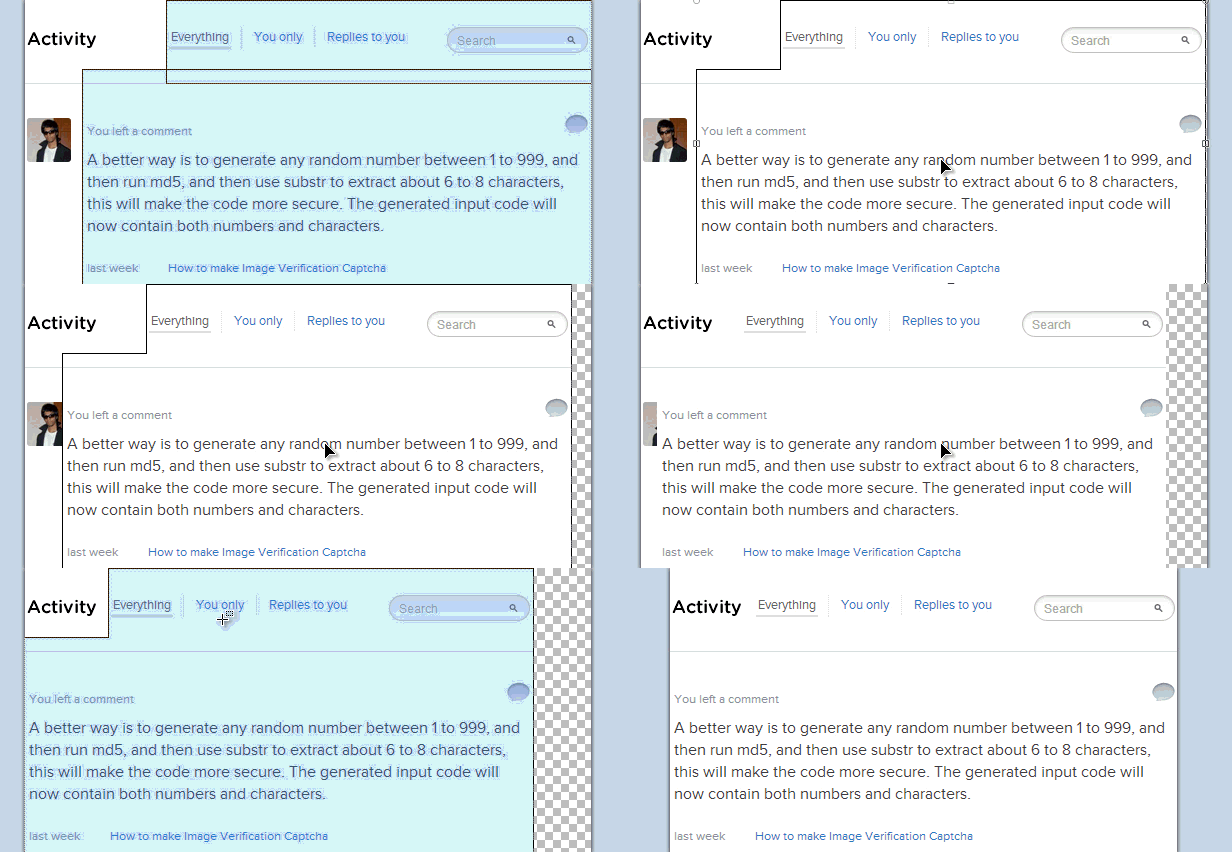
These are a series of steps that include cutting off the white-spaces from the images, and thus creating more of area to crop off. This is not applicable for full screen screenshots.

As I mentioned it is all about, curtailing off white-spaces that is removing the part of screen shots that have no content or content that can be ignored.

For this tutorial I will use Paint .NET. You can use other as long as they have some common functionality.


best way to resize image
Original Screen shot but it is 981px in width
Now, no text in the image is visible, my aim is to re-size it down to less than 700px.

Re-sizing screenshot

  1. Open the image in Paint .NET.
  2. You are required to use only three tools, Rectangle Select (shortcut key S), Lasso Select (shortcut key S twice if on any tool except rectangle select), Move selected Pixels (shortcut key M).
final resized image
Final Result Rendered 622 px wide from 981px
As you can see all the white-space is gone, and some not very important components have been cropped off.


area to be removed
Original with highlighted area to be removed
What is removed-
  1. Information is parenthesis, erased using eraser.
  2. "Add Site" button removed using eraser.
  3. White-space between "Your Sites" column and the vertical divider removed using rectangular selection and move selected pixels.
blogger resize screen shots
Selecting and moving pixels

Another way of resizing screen shot

All new sites are designed using the responsive css. So, all you need is to resize your browsers size, and then site take screen shot.

Wednesday, 7 August 2013

Get Despicable Me 2 and Pandi stickers for Facebook Chat

| Wednesday, August 07, 2013 | | Be first to comment!

Facebook smiley were used every where in almost every chat. Smiley sometimes, act as mood changer and help you express yourself or your moment in a better way.

get despicable me 2 stickers for Facebook chat
Stickers Store Facebook
Facebook now allows you to make your chat more expressible with your favorite animation movie and cartoon characters. You get to select from a bunch of menu. The available options include, Despicable Me 2, Snoopy, Finch (are a better version of the old smiley), etc. All these will help you make your chat more happening.


The only problem is that, unlike the regular smiley you don't have any simple code to write like :), :D, etc. And as soon as you click on any of the sticker they get posted, it is your choice to place your message first or your sticker first.


By default you will have only the regular smiley and Meep stickers you need to add the rest using the Stickers Store. With Meep (better version of the classic smiley package) you will use the classic smiley only when putting then using the expressions like the above :D, :), :(, etc.

Tuesday, 6 August 2013

Do conversions using Google Convertor

| Tuesday, August 06, 2013 | | Be first to comment!

Doing different conversions are a part of daily usage of many people online or offline. Using phone or smartphone applications are the newer version of accomplishing such tasks but not everybody is interested in downloading and installing apps for doing some conversion for once in a month, sometimes frequency is greater.

With Google you can do a number of conversions. Though this feature has been around from a long time but a lot still don't know these functionality.  The available options are-
  1. Temperature,
  2. Length,
  3. Mass,
  4. Speed,
  5. Volume,
  6. Area,
  7. Fuel Consumption,
  8. Time, and
  9. Digital Storage
Conversion can be done simply by typing in the search bar. For example, if you want to convert a value from Kilobit (Kb) to bytes, then simple type "800 Kb in bytes", as simple as that.

ALSO SEE: Peek inside NYC Restaurants with Google Maps
Meet 10 for 10 Adsense Publishers in HD
Secure Facebook with Trusted Accounts
unit conversion using google
Converting using Google

Currency Conversion

Currency conversions are also possible but they come under the finance part of the Google, and are unavailable on the conversion widget displayed above. The reason is that the conversions listed above are fixed unit conversion whereas the currency conversions are not fixed they tend to change on daily basis. Therefore they can't be placed with the regular unit conversion widget.

Google currency converter
Currency Conversions using Google
Currency can be converted similarly as the unit conversions using the same simple process of typing as a string or sentence. Another example, to convert pound to dollar type in "1 pound in dollars".

Sunday, 4 August 2013

Facebook new Insight for fan page

| Sunday, August 04, 2013 | | Be first to comment!

With every fan page you create on Facebook, you get an admin panel and an insight page too. The insight page lets you have a full detailed analytic data regarding your Facebook page. 

It allows you to track every instance (free or paid), to be tacked down. You each and every posts, you can track reach, posts clicks and likes and comment in details with numeric count and charts.
New Facebook insights for fan pages
Click to enlarge: Recent posts reach & engagement details

This interface is still available in beta phase and it is required that you must be using Facebook as "you" not as your page.

Get New insight

  1. To get the new insight, now.
  2. Log-in into your Facebook account.
  3. Switch to use Facebook as your page.
  4. Now, navigate to Home using the head "Home" menu.
  5. Select "Insights" from the Favorites.
  6. Now you will get a "Try New Insight" button.
  7. Right click and copy the link, you can directly click too but it will show you a message saying you are required to use Facebook as you not your page. And you will have a button saying "Continue as [your name]" but it may not work.
  8. So, copy the link, and then switch back to you.
  9. Now, paste the address in your browsers address bar.
This is required to be done once then you will be redirected to the new insights whenever you will try to access the insights.


Insight option appears on your page
Now, you will get message like the above on your page you don't even require, to switch to use Facebook as your page.


total likes as per each day on Facebook
Total Page likes on each date
The new insight is divided into four main parts namely, Overview, Page, Posts, People. With the new insight you can track when your page loosed a fan or your page was in a way un-liked or disliked. This was not possible before.

You can also track-

Users landing on your page from outside Facebook.
Pages and Tab visits
Posts by other, offers purchased from your page
This one is best, when your Facebook fans are online. This helps you know what is the best times to publish a post an it will reach the maximum number of your fans.
Track by demographics and gender.
Viewers were fans or not.

Monday, 29 July 2013

How to see new likes on your Facebook Fan Page?

| Monday, July 29, 2013 | | Be first to comment!

Having a new like is great, and knowing who liked is even better. See the list of new and recent likes by others on your Facebook brand page. Explore all of them make new admins, explore those who like your content and admire it.

list of new likes on Facebook page
List of recent fans of your Facebook page

How to see new likes?

  1. Log in into your Facebook account.
  2. Switch to your page.
  3. Now click the friends button from the header navigation bar.
Whenever a new like or fan is gained, the person is highlighted in this list. You can access all your fans using this list.


You can also have a look at other Facebook Pages that like your fan page. To do so, 
  1. Click "See All" link in the likes list.
  2. From the frame that opens you have a drop down menu at the top left.
  3. Toggle using the drop down.
other pages that like your brand page facebook
Other pages that like yours
You can also promote any fan to admin from here, but if you do so make sure you know him/her personally and now it is required that you must know their email address to do so.

As soon as you will click the "Make Admin" button you will be redirected to another page from where you can specify a "role". Giving a role means that you are giving the user restricted privileges for your page, like insight analysts can only view the new likes, posts submitted on your page, people talking about, etc.

Friday, 26 July 2013

Top 5 Benefits Of QA Testing

| Friday, July 26, 2013 | | Be first to comment!

Quality assurance is the process by which products are checked to make sure that they meet specific standards. QA Testing is the means by which these standards are assured. Software development companies use software quality assurance as they attempt to put out products that are free of errors for the end users. However, some startup establishments in the software development industry often overlook the importance of this step.

Question and Answer session
Quality assurance is not simply a formality, but it is undeniable that when this part of the development process is not applied the company may then fail in delivering a program that meets all the client’s requirements. The reason for this is that there is no assurance that the diverse operations will be fully operational.

What exactly is QA?

During software development, QA is the process by which developers observe the many processes to determine if they are all functional. Typically, there are a number of sub-processes written into the programming of software that must be functioning before the end product is sold.

While it is true that QA Testing is intended to make sure the delivery of a quality product, there are other considerations as well. For instance, when a product is well designed and the appropriate testing applied, there is a greater chance that the customer who purchases it will be better satisfied. This not only leads to customer satisfaction, but is also good for business in other ways as well. One way is better reviews and consumer feedback which increases the likelihood that more sales will occur.

Using software quality assurance allows developers to identify and then correct or eliminate errors that may be found. This truly saves time because once in the hands of clients or customers the process to correct such errors is likely to be extended adding to the cost of the product.

Benefits of QA Testing

  1. The first benefit that is derived from software quality assurance is that it helps reduce the need to make alterations to the application. By applying appropriate testing procedures, it is possible to fix anything that is found to have errors or bugs by identifying them and then making changes required to eliminate them. The time savings benefit can be significant.
  2. When proper testing procedures are used throughout the development process, errors can be recognized in the initial stages and then cleared up are required. This eliminates the need for the expenditure of extra time and money to correct problems after the software development has been completed.
  3. Through QA Testing, developers are better able to understand the diverse requirements of clients.
  4. Problems within applications are more easily recognized during testing.
  5. Attending to the details of quality assurance helps clients to see that developers are interested in delivering higher quality work. This can mean that the same clients will return to request additional service.
It is certain that QA Testing will add time to the process of development, and one could say that adds to the expense. However, the real cost comes with not performing the required testing to ensure that the end product is high quality because it will come back to haunt any developers in terms of added expense or loss of paying customers.

Even though one cannot fully guarantee that the software will be 100% devoid of problems, the end product will be significantly better than if the proper testing procedures had not been followed.

The question is, can you afford to forgo quality testing for the sake of getting the software out quickly or under budget? Probably not. To omit this critical step in development is tantamount to sabotaging your own efforts. You really cannot afford to do that now, can you?
Author's Bio: Barry Wong is an author for QA Consultants. They were founded in 1994, QA Consultants is the largest Software Quality Assurance and QA Testing consultancy in North America. QA Consultants is focused on helping our clients and partners achieve extraordinary success in their Quality Assurance and testing efforts.

Thursday, 25 July 2013

Target users on facebook fan page with privacy controls

| Thursday, July 25, 2013 | | Be first to comment!

Targeting is of great importance when it comes to marketing your product/content to the right audience. Marketing and promotions are very less efficient when it is not targeted to the right audience.

Facebook allows you to target the specific audience among the fans, i.e. the users you have already liked your page. This can be accomplished using the Privacy Control settings of the fan/brand page. The only draw back is that, publishing with targeting specified in your post, will only filter out the individuals who don't lie in the specified criteria.

targeted post on Facebook page
Targeted post on Fan Page

To use this feature you need to turn on or enable privacy control feature. You need to allow yourself to control the privacy of the post you will share on you Facebook fan page.

Turning On Privacy for Fan Page

admin panel and edit settings of Facebook fan page
Edit Page settings of Facebook Fan Page
  1. Go to your page.
  2. From the admin panel, click on "Edit Page" drop down menu.
  3. From there select "Edit Settings" option.
  4. On settings page, search for "Post Privacy Gating".
  5. Edit "Post Privacy Gating" and check the only option present there (Allow me to control the privacy of new posts I make on my Page).
  6. Click the Save button.
change Facebook fan page settings, targeting
Post Privacy Gating : Check the option to allow targetting
NOTE- You have no loss in posting your Facebook status without targeting, but you may loose some fans. Loss of fans is very likely to happen in case of multiple posting within a single day. On pages with high number of likes, any admin cannot determine loss occurred.

Wednesday, 24 July 2013

Like and Comment as Company on LinkedIn

| Wednesday, July 24, 2013 | | Be first to comment!

The market is always filled with rivals, and to win you need to perform every step that lets you forward even by a single step. After Facebook, Google Plus, etc. Now, LinkedIn has also introduced a new feature for brand pages.

Like and comment as company/brand linkedin
Like and Comment as the brand page : LinkedIn
LinkedIn users can now like and comment as the brand/company they represent on the company pages. The only limitation is that you simply cannot switch between you and you page, you get switched automatically whenever you are logged in and you access you company/brand page. This automation may come to end with new updates.


It is not clear if the switching will be made accessible to the administrators or not. Maybe the next upgrade will have this or as LinkedIn is running on a freemium model, these kinds of upgrades may be reserved for premium users. 

This is probably the first step towards brand/fan engagement, and may get even better with possible future updates.

Sunday, 21 July 2013

Create Stylish Feedburner Email Subscription Form yourself

| Sunday, July 21, 2013 | | Be first to comment!

Doesn't matter if you are a BloggerWordPress  tumblr, joomla, etc publisher. A lot or I must say maximum still rely on Feedburner for publishing their RSS and also for email subscription.

Building readership via email newsletter is as important as other parts of blogging like creating content and promoting on various social media platforms.
customize or style you email subscription form
Feedburner Email Subscription Form
Blogger users use custom build or mostly Blogger's official widget for creating their email subscription form. But as of today, having your subscription are highlighted is very important. So here are some steps that you can apply to customize your email subscription form as you like and you can alter them as your  wish or requirement of your blog.

NOTE- This tutorials take into consideration the fact that you are using official Feedburner widget on Blogger though once through you will be able to alter you WordPress widget too.

ALSO SEE: Change slider image of blogger template, and
Redirect Blogger blog from non-www to www domain.

Blogger or official widget

If you are using Blogger platform and official widget from "Add Gadget" option. Then in such case the styling of the email input text field and submit button comes from two CSS classes. 
  1. Email input field's class is named - follow-by-email-address, and
  2. Submit button class in names - follow-by-email-submit.
All you need to do is override these with custom value. To do so there are two methods, 
  1. Using internal stylesheet, or
  2. Using inline styling.
For some reason inline styling is considered bad for SEO as it increases loading and page rendering time. But if you don't have any inline styling it wont matter at all. And in maximum of blogger templates there is no use of inline styling. So feel free to use it.

Email Field,

  1. Go to Blogger, log-in and select the blog from the list.
  2. Go to your blog's "Template" menu and then to Edit HTML.
  3. Use "Ctrl + F" shortcut to search for follow-by-email-address.
  4. And then you will get one result, replace the code starting with 
    <input class='follow-by-email-address' name='email' placeholder='Enter Email Address...' type='text' /> 
    with 
<input class='follow-by-email-address' name='email' placeholder='Enter Email Address...' style='background-color: #f4f4f4; padding-left: 8px; -webkit-border-radius: 6px; border-radius: 6px; height: 33px; width: 280px;' type='text' /> 
 Click Save and review your template.

Submit Button,

  1. Use "Ctrl + F" to find  follow-by-email-submit and replace 
    <input class='follow-by-email-submit' type='submit' value='Submit' />
    with
<input class='follow-by-email-submit' style='background-color:#ff9933; -webkit-border-radius:6px; border-radius:6px; height:35px; width:100px; font-weight:bold;' type='submit' value='Submit' />
Click Save and review your template.

You may have a number of problems. So now the following will tell you how to troubleshoot it. For that, alter the values of the style attribute, the only error that you will encounter will be because of the difference in the sidebar sizes. 


Change email subscription forms style
follow-by-email-address style
To troubleshoot that, alter the value of width. To change the corners of the button and email field alter the value of -webkit-border-radius and border-radius keep the value of both same. This will avoid confusion (if any). To change the color of the button change the value of background-color you can get the appropriate colors and their hexacodes from Color Picker.

Friday, 19 July 2013

Peek inside NYC Restaurants with Google Maps

| Friday, July 19, 2013 | | Be first to comment!

Welcome to NYC's Fig & Olive Restaurant via Google Maps. Click the image below to enlarge. More maps will join Google's mapping service soon.

Fig & Olive Restaurant Google maps inside view NYC
Fig & Olive Restaurant Inside View : Click to enlarge

Google Maps is getting better every day. After rolling a still in trial version of the New Google maps, Google Maps has introduced some new maps.

Click See inside to view restaurants from inside
New York City have over 25,000 restaurants approximately. These maps allow you to have a 360 degree view of the New York City restaurants from the inside. These help out greatly in deciding which one to select in accordance to the occasions or maybe just to have a perfect place to eat.

Post images in Facebook comments on brand pages

| Friday, July 19, 2013 | | 2 Comments so far

Facebook launched photo posting feature for comments. But the feature was limited to Facebook profiles only. Now the feature has been expended to the Facebook brand pages. Both page users and administrators can post photos in comments rather than simply using text.
Post photos in comments
To post a photo comment simply click on the photo icon next to the comment text field, after that upload any file that you want to post.

comment on fb page
Photo Comment
Post and it is done. The feature is available for both Facebook desktop as well as facebook application for Android, windows phone and iOS. But it is still unavailable for users using mobile version at m.facebook.com. The users of the mobile version are required to wait for the next platform update, it may include it.

Thursday, 18 July 2013

Try New Google Maps

| Thursday, July 18, 2013 | | Be first to comment!

Google has rolled trial of New Google Maps, with an all new full screen interface. To access this version of the maps, you need to go to Google maps and from there click the "Get the new Google Maps" banner. You can always switch back to the classic version of Google Maps using the "Help & Feedback" drop down at the upper right corner of the interface.

See maps in 3 dimensions on Google maps
3D Maps on New Google Maps : Click to enlarge
For sure this newer version has got the navigation controls to toggle between the different view angles. Whenever any place is searched you can get a series of photos. When a user hovers on any of these image, the image points to where, it came from, i. e., you can select these images to get the street view of that specific place.

Navigation is also possible when in Street View mode. When in Street Mode hover the cursor and different places on the map. The cursor changes to navigation directions, click when it is appropriate according to you and the entire canvas will move in that specific direction.

While using the new version which still is in beta phase, you may want to switch back to the old version. 

street view of silicon valley Google maps
A road in Silicon Valley with navigator arrow
With the street view and the navigation, you can navigate like walking down the street the only difference you can walk very fast depending on your internet connection speed.

Wednesday, 17 July 2013

Stock Market watch apps for Android

| Wednesday, July 17, 2013 | | Be first to comment!

If you are busy in investing in stock market to have some profit. Then the first requirement is to have an active watch on the stock markets. Well, I have almost no idea about stock markets but I will let you know the perfect applications that you can use, if you are an Android user.

Finance

News tab of stock market watch Android Application
Google Finance App :: News Tab
Finance or Google Finance is an application by Google. it uses your Google account credentials to log-in n into the application. from where you can have real time quotes and portfolios. It synchronizes with Google Finance portfolios and lets a user have quick access to charts, comp news, and latest market.

Stocks

Not very different from Google Finance as this application too, synchronizes with Google Finance. You can view company news, have a watch on stock markets, etc. You get data from markets in US, Canada, UK, HK(15 minutes delay), Japan etc.

But as of user preference, this application is much more popular and preferred among the users. So, if you are going to install Google Finance or you are currently using Google Finance, then you must give it a try,

Stock Watcher

Another market watching application but this is does not rely on data by Google Finance, rather the data displayed is taken from Yahoo Yahoo Server in US, UK, Germany, France, Spain, Italy, Australia, New Zealand, Singapore, India, Canada Mexico, Brasil and Argentina.

You get financial news (RSS), access to portfolios, twitter news search, run application is full-screen mode, have a look on technical indicators like ROI, RSI, MFI, etc.

NOTE- These app may produce delay, due to a number of reasons like slow net speed and bad connectivity, etc. at the extremes, so blindly relying on the data feed via these applications is not advisory. For, important decisions use the regular methods of market watch. These application are meant for having data on the go.

Thursday, 11 July 2013

Transfer files using WiFi Mobile AP (Access Point)

| Thursday, July 11, 2013 | | Be first to comment!

Sharing large files like OS, big software like Photoshop, Music Videos or Movies via USB takes a lot deal of time. Though, we have USB 3.0 available but on that too, you need to first transfer files to flash drive and then the receiver is required to copy it to his PC. Sometimes, one of the two machines don't have USB 3.0. In such cases, you are free to use your machines WiFi to get the task done amazingly fast.

WiFi logo transfer files wireless
Transfer large files over WiFi
To transfer files using WiFi, first requirement is to create a WiFi hotspot or Mobile Access Point. Mainly there are two ways to do so first by using Windows command prompt or using external software.

ALSO SEE: Use Google Chrome browser as Windows 8 application
Select default OS during boot up

Some manufacturers like Samsung provide built in software to create, enable and disable Mobile Access Point. All you need to do is turn it on. In case your Samsung machine don't have it, then you can download SW Update from Samsung's website for your model.

Creating Mobile AP (Access Point) Using Command Prompt

  1. Open Command Prompt (Admin) using Windows + X shortcut key or by right clicking the start in Windows 8.
  2. Use "Netsh wlan show drivers" command to check active wireless device and drivers information.
  3. In the output result that is generated in your command prompt look for Hosted Network Supported it must be Yes.
  4. Now, you need to set Network's SSID and password to make the connection secure.
  5. Use "Netsh wlan set hostednetwork mode=allow ssid=<ssid> key=<password>" where ssid is like your username and key is like your password to access Mobile AP. Example, "Netsh wlan set hostednetwork mode=allow ssid=sectortechno ket=sect0rtechn0".
  6. To enable or start your hosted network use "Netsh wlan start hostednetwork".

Creating Mobile AP Using Settings in Samsung laptop

  1. Open Settings navigate to Network.
  2. Open Mobile AP tab from Network.
  3. Mobile AP must be off if you want to change username and password.
  4. Enable or start it using On/Off button.
Creating Mobile AP using Settings in Samsung

Creating Mobile AP using third party software

There are a number of third party software to do so you can use Connectify from connectify.me but it is paid software you can download free limited trial version of the software from the website.

Transferring files over WiFi

Now, with one of the device as Internet AP, connect the other one to it. After connecting open built in software named "Easy File Share" available in Windows 7 as well as 8 and 8.1 too.

Share large files over WiFi
Easy File Share : Share files fast over WiFI
NOTE- Only one device is required to have enabled Mobile AP. The other is required to be connected.