Thursday, 1 March 2012

On screen keyboard

| Thursday, March 01, 2012 | | Be first to comment!

Keylogging or keystrokes loggers are undetectable software that monitor your keyboard activities and forward to some other. So, for putting passwords are very unsafe if through keyboard. So, there a program in Windows called On Screen Keyboard.
On Screen Keyboard is a virtual keyboard displayed on screen. If password or other confidential information is entered via On Screen Keyboard, then instead of keystrokes mouse-clicks are recorded and thus, your password is safe.

To open it-
Go to- Start menu> All Programs> Accessories> Ease of access> On Screen Keyboard.
or simply type "osk" in run or search bar in start menu(windows 7).

Blog Offline via Windows live Writer

| Thursday, March 01, 2012 | | Be first to comment!

Open Windows Live writer. It's free you can download it here.
1. Open your Windows Live Writer.
2. Go to Blog Account > Blog Options> Update account information.


3. Add a blog account. Put the address of your blog there, your email address, password. Click next, a dialog box will open showing your blog account being set up.
After that a list of all of your blogs associated with that your mail will open up. Select any one which you want to edit.


4. It will ask you to download the template of your blog. Now, this is a very good option provided by Windows Live Writer. It downloads and installs the template of your blog and you can preview what your blog gonna look like.


5. Set up Blog nickname- by default it displays the name of the blog. But you can change it to any. It won't affect the blog title.


Now you are ready to go. You can add post title, post body and if you want to add labels to your post just put it in the category bar. Before publishing you can Preview your blog from Live Writer only. It has a tab to preview in bottom.
But it never worked correctly in mine especially when photos are added to it. Preview on net and Windows Live Writer were different with photos.
You get two options to "Publish" and "Post draft to blog".

convert any ms office format to any other also PDF

| Thursday, March 01, 2012 | | Be first to comment!

Some days before I was busy downloading some software that would convert my word documents to PDF. All the software that I got and went through were useless. Problems ranged from non working to working, but these which worked left a watermark on my documents.
Now here's the solution launched by Google Docs.


Just login into your Google docs.
Click the upload icon. There you will have the options to upload a single file or a folder. Select the desired.
Then select the file you want to upload.


Upload completion will be shown on right bottom of your windows. Notice it has a limit of 1024Mb. But don't worry, it's hard to reach there.


As the upload is complete, it'll be shown in the documents list.
Open it.


The doc will be opened in anew tab.
Go to File> Download as> ODT/ PDF/ RTF/ Text/ Word/ HTML (Zipped).


You're done.


Wednesday, 29 February 2012

url shortner

| Wednesday, February 29, 2012 | | 2 Comments so far

On many websites, like twitter, 160by2, way2sms. You have a character limit of round 'bout 160 characters per message or tweet. In here if you want to send a link with a message, the character lengths exceeds 160 and makes you unable to send the message and link together.
For this here's a solution.

shortened url
You can get you large url shotened to 'bout this much. There are sites that provide you with facility to shorten your url, they are-

Best app for screenshot

| Wednesday, February 29, 2012 | | 2 Comments so far

Screen Grab from No Nonsense Software. Though Windows 7 comes with it's own screenshot app called Snipping Tool.
Cost: free.   Download.

Nokia 808 PureView

| Wednesday, February 29, 2012 | | Be first to comment!

Nokia ready to launch Nokia 808 PureView.
The most awesum feature of this new launch is that it has got 41 MegaPixal camera. Has HDMI and DLNA outputs, NFC and Wi-Fi. More over, Nokia Maps for navigation, sixteen Gb built in memory which is expandable upto 32Gb or 48Gb.
Phone has height, width and thickness of 123.9mm, 60.2mm and 13.9mm respectively, and weighs only 169grams.

Philips DS6100 Speaker Dock

| Wednesday, February 29, 2012 | | Be first to comment!


Philips DS6100 Speaker Dock has aluminum casing and silver finish. Excellent suiting with Mac's design, iPod and iPhone. It has a pair of neodymium

speakers that output at 20 watts RMS(root mean square). Dock also has a 3.5mm jack to connect other devices.

Price $180 (expected)
arrival may 2012

Nikon D800

| Wednesday, February 29, 2012 | | Be first to comment!


Nikon launches all new D800 DSLR camera. It has a 36.3 megapixel CMOS sensor. 
Also has advanced Scene Recognition System
It has EXPEED 3 image processing engine with 91,000 pixel RGB sensor.
ISO sensitivities ranges from 100 to 6400, with extended Lo 1(50) and Hi 2 25,600 ISO sensitivity.


In simple words its just awesum.


You may also like-

Understanding Blog

| Wednesday, February 29, 2012 | | | Be first to comment!

It was May 2009, when I found blogger. Created one for myself. Blogged and still had one question in my cerebrum. 
What is blogger?
Blogger is a service provided by Google, that lets you host a website or a diary of your own that has posts. Now a particular website or diary is called a blog, and the date to date content is called post. These posts are arranged in reverschronological order, i.e, recent dated post first.

There are other services that provide with this service, like Wordpress, TypePad, LiveJournal, etc. But I recommend to use Blogger.

Actually this thing was always on the web, but I was searching wrong by putting blogger in Google search engine. So I have an intuitive feeling that some others may also be searching the same and for them here it is.

Creating Google Adsense account

| Wednesday, February 29, 2012 | | 1 Comment so far

Go to blogger.
Select any one blogs from the list of your blogs.

Go to Earnings
Create Account
Here if you already have an account you can link it through 'Link the account'.

Sign up for Adsense 
Fill Up the form
Remember this is not Gmail account that you can create one after the other. Google provides one account per person. Even the same address cannot be entered for two accounts.


You may also like-


Where to promote my blog

| Wednesday, February 29, 2012 | | | | Be first to comment!

Just another question. But a quite good one.
Where to promote my blog?

  1. Google+
  2. Facebook
  3. Twitter
  4. Stumble upon
  5. If you comment on others blog you read. Then if asked to put website you must put it. Don't spam.
If you have more comment it. It'll be added.

What Adsense Pays You

| Wednesday, February 29, 2012 | | Be first to comment!

What Adsense Pays You? The basic question that I had from the beginning. But never got the answer. I tried to search a lot. Google never discloses it. Every search showed this.
But finally I have the answer- According to some survey Google Adsense pays you 70% approx of the revenue collected from the ads.

How to blend ad of Adsense on custom templates

| Wednesday, February 29, 2012 | | 2 Comments so far

Look at these two ad units-

Adsense not blended. Looks separate and even template looks weird
Adsense blended. Don't looks separate and even template looks normal.
It's no cheat to blend your adsense with template. Google recommends to blend it.
You need- screen grab or snipping tool(available in Win7) and Photoshop or Paint .NET.

How to-

1. Just take one screen shot.
2. Open it in Photoshop or Paint .NET.
NOTE- The screenshots below are of photoshop, you can also use Paint .NET which is free available on internet. Steps are quite similar.
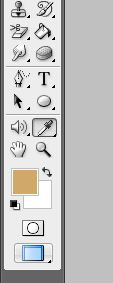
Choose pick colour 
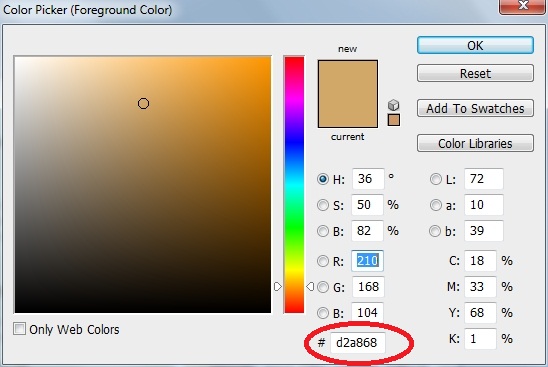
3. Pick color from templates. Like text color, background color, link color. You will need to access hexadecimal color code.
click on the color
4. This box will open.
Copy this hexadecimal code.
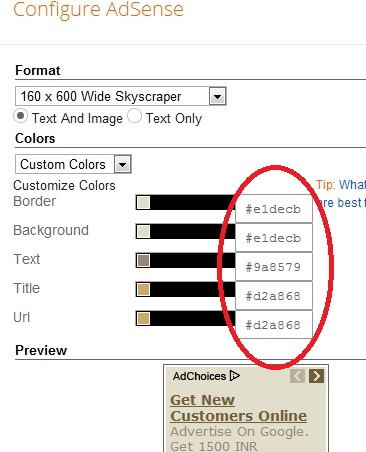
Paste the codes here with #
Apply and you're done.

Is my account information secure on Google Adsense

| Wednesday, February 29, 2012 | | Be first to comment!

Google uses standard SSL technology to protect your information. Taxpayer ID numbers are in encrypted format, this provides information with additional security. Google can share this information with trusted third parties for the purpose of verifying your identity. 
Don't worry.

What is SSL technology-secure socket layer.

Earnings on hold Google Adsense

| Wednesday, February 29, 2012 | | Be first to comment!


When I logged into my Google adsense page. It says earnings on hold. This is basically due to incomplete Adsense profile. In the image above the earnings are below threshold. But that is not the reason even if the earnings are above threshold you won't receive any payment in any form.

How to complete profile

  1. Address verification- Google needs to verify your address, for that Google will contact you on the address given in profile and will send you a verification PIN. Enter that verification PIN.
  2. Payment method not selected- There are many options, how you want to receive your payments. Select one.
  3. Tax information- Google needs your tax information. Is my information safe on Google.
  4. Payment threshold- You need to reach minimum paymant threshold, for payments to be made.
After your profile is complete.


Understanding Adsense Performance reports

| Wednesday, February 29, 2012 | | Be first to comment!


This graph is available in the performance tab of the Adsense.
Check the boxes to see in graph.


Q. What is-

Estimated earnings- Your account balance for the time period selected. This amount is an estimate that is subject to change when your earnings are verified for accuracy at the end of every month.
Page views- A page view is generated every time a user views a page displaying Google ads. We will count one page view regardless of the number of ads displayed on that page.
Clicks- For standard content ads, the number of times that a user clicked an ad. For link units, the number of clicks received by ads on a page resulting from a link click.
Page CTR- Page click-through rate (CTR). The number of clicks received divided by the number of page impressions.               CTR= clicks/page views
CPC- (Cost-per-click) Amount that an advertiser pays each time ad is clicked. In your reports, your CPC column reflects your estimated earnings divided by the number of clicks that you've received.
Page RPM- Total earnings divided by one thousand page views.
 Well you can get these terms by clicking the '?' icon.
What is actually paid?

Basic concern of beginners viewing adsense performance report

| Wednesday, February 29, 2012 | | | Be first to comment!

Basic concern of beginners viewing adsense is what you will be paid.
Click to enlarge

If you look at the totals you'll be confused. Should I add them all or anything else. But you don't have too. Basically it's the esimated earnings that you are paid. And the estimated earnings are a bit lower from what is displayed on your Adsense dashboard.

After end of each month, your adsense total earnings are recalculated and finalized which results in a bit lower. Actually, your total revenue collected is verified and the end of each month. This results into some deductions.

Saturday, 8 October 2011

Resume download in IDM when it forbids

| Saturday, October 08, 2011 | | 3 Comments so far

Sometimes when you try resuming downloads, it says-
Cannot resume downloading the file:It's possible that the address of the file is not valid anymore or your session has expired.Please start the download of the same file from your browser manually, and IDM will try to capture a new address or new session data to resume this download


When you press OK it opens up IE or your default browser to get a new address but still the download does not resume and starts from beginning. And it will get to your nerves when this thing happens when you are downloading a large file and it stops at 90% or above.

When it happens go to the file you want to resume. (i.e. in you unfinished download). Select the file, right click it and open properties.
Generally what happens is that the address of the file on server changes and it tries to resume from the web page address(the highlighted address below is the changed one. Usually the address is with the same extension name as that of the file you are downloading.)
Now all you need to do is copy link from the web page from where you started downloading and paste it in address bar-
Press OK and then resume it.