Monday, 7 October 2013

Comparing SEO Strategies for Twitter and Facebook

| Monday, October 07, 2013 | | Be first to comment!

Although Facebook and Twitter are both considered social media sites, the two have their differences. With Facebook, you create your own personal account complete with a profile (listing as much or as little information about yourself as you want). You can also include pictures, videos and anything else you want. Twitter also requires you to set up a profile along with any pictures and/or information about yourself. Both sites let you communicate with others who are also members of these networks, but the way you communicate is where some of the differences lie. 

Facebook messages can be a lot more private than those on Twitter although you can still post a more public message on Facebook if you want. The way you post your messages is also different. Another difference is how both these sites affect search engine optimization—SEO—with regards to Google which is the largest search engine in the world. 

Who is more popular—Facebook or Twitter?

Facebook is the winner when it comes to the amount of followers. As huge as Twitter is around the world, it still does not have nearly as big of an audience as Facebook. But do not assume that this affects who has the greatest SEO power. Google looks at both social media sites as equals when it comes to SEO. Sure, you can use one for SEO purposes more than the other, but there is no difference in the way this works. The bottom line is that if you are looking to use SEO, you will need support from members of both Facebook and Twitter. 

Blog promotion—Facebook or Twitter?

Facebook may have the upper hand when it comes to blog promotion and SEO. Facebook allows you to share your blog post with an attached link that members can simply click on and visit. If members decide to share your link with others, search engines will notice this. Unfortunately, Twitter does not have this type of tool so it loses its edge when it comes to reaching a large audience. 

However, Twitter comes out ahead in terms of blog promotion because you can use something called micro blogging. While this may sound a bit much, you can continually nag people via Twitter to read your blog. You may lose a few annoyed followers, but you would lose a lot more on Facebook from the constant pestering to read your blog. The other advantage with Twitter is that people are already following you and what you have to say so they are a more inclined to read your blog. 

Website promotion—Facebook or Twitter?

Facebook has the benefit of letting you add posts that are large, contain images or videos, or have their own links. You can only micro blog on Twitter which means you are limited when it comes to methods of promotion. Facebook definitely offers more of an advantage when it comes to SEO promotion. It allows you to add links, “like” something, share something and re-share something. It also gets people talking about whatever it is you are promoting. All of these affect SEO. With Twitter, the only things possible are tweeting, re-tweeting and linking which have less of an effect on SEO. 

Most engaging—Facebook or Twitter?

This may be a matter of taste and preference. For those who like to read micro blogs, Twitter would be the more engaging of the two. But in terms of SEO, how will you know which SEO effectors are the best options for your blog or website? The answer may be in the links. Any link from a Facebook or Twitter profile is going to have some sort of an SEO effect. By no means will it be as great as a link from a website, but it still has some SEO benefit. Neither one is stronger, though. Thirty re-tweets with your link on Twitter is no better or different than thirty “likes” on Facebook for your blog.

Final thoughts

To find the best SEO benefits from these social media sites, try testing them on your social media profiles. You will definitely get advantages from both—it is just a matter of figuring out how to use them to their fullest SEO potential. 

Author’s Bio: My name is Sonia Jackson. I write for site http://www.cool-essays.com that provides well-written and quality essays and research papers for college and university students.

Tuesday, 1 October 2013

Google Analytics Application for Android devices- Analytics at your fingertips

| Tuesday, October 01, 2013 | | Be first to comment!

Google's Analytical tool's newer version is live at Google Play store. Though the newer version is available only for Android 4.0 and up, but the new application is loaded with a lot of features.

The new version is exactly a minor version of the Google Analytics, as it offers almost all the features that are required to do active analytical watch. 

Monitors available

  1. Overview
  2. Real Time Traffic Tracking - The new version of Google Analytics app also have Real Time analytics. Therefore, now you can track real time visits to your website/blog.
  3. View audience based on language, location, new vs returning, browser, network, mobile overview, mobile devices.
  4. Traffic Sources- all traffic, direct traffic, search overview, organic search, paid search, social.
  5. Content- all pages, landing pages, exit pages, site speed, top events.
  6. Conversions- overview and goal URLs.
Below is the image of the sources which provides details in visualized format (graph) with percentage as well as numeric data from various countries and territories. In the screen shot below the data collected is from 98 countries.

ALSO SEE: How to add new users to your Google Analytics?
Track your visitors flow with Analytics
E-mail your Google Analytics data directly from google analytics
Visitors overview in Google Analytics app for Android
Sources Overview: Google Analytics
Easy navigation for accessing and moving through the data and accounts very easily. Switching between different accounting profiles is now a work of seconds. Open the list using the drop down menu, in this case where it is written 'Sector Techno' (refer to image below).


You can also change Chart Granulariy, see your data in daily, weekly or monthly basis. With all of these features, Google Analytics app for Android is complete app to monitor your websites traffic on the go.

choose analytic data from daily, weekly or monthly
Choose Granularity
Author's Bio: Shubhashish Shukla (follow him) is the person behind Sector Techno (twitter, facebook), a technology blog. An always learning web developer.

Friday, 27 September 2013

Search for "Google in 1998" and take a peek back in 1998

| Friday, September 27, 2013 | | Be first to comment!

Google is celebrating its 15th birthday Friday by launching a Doodle with a birthday cake. Along with this, there is one more search query launched, that allows you to take a peek at Google back in 1998. Just type -

"Google in 1998"
Google has also rolled out, an update to its core search algorithm, named 'Hummingbird'. Before this, Google made core search algorithm update in 2010 named 'Caffeine'. The new update is made to cope up with more larger and complex search queries. It has reportedly effected 90% of total search queries.

take a peek at Google back in 1998
Google back in 1998
The above query will return 237,000 result for "Google" with visuals of Google as they were back in 1998. The number of results are different from the actual query as it will return 1,940,000,000 results.

ALSO SEE: How to see new likes on your Facebook Fan Page?
How to add new users to your Google Analytics?
Email Google Analytic data directly from Google Analytics

Author's Bio: Shubhashish Shukla (follow him) is the person behind Sector Techno (twitter, facebook), a technology blog. An always learning web developer.

Sunday, 22 September 2013

Grand Theft Auto 5 crossed $ 1 billion sales in only 3 days

| Sunday, September 22, 2013 | | Be first to comment!

The Rockstar's latest game innovation, the Grand Theft Auto 5 has successfully broken the revenue collection record by collecting over $ 1 billion in just three days. The game made sales worth $800 million on the very first day. While, the analysts were expecting to earn $ 1 billion in the first month.

The game became the fastest selling game in the UK, selling 1.57 million units on the first day collecting £65 million.

Before this, Call of Duty Black Ops earned $ 1 billion but it took almost 15 days to reach $ 1 billion mark. Where as GTA 5 took only three days. Rockstar spent $115 million in the games development and $150 million in marketing.

The game is till now only available for XBOX 360 and Playstation 3. The online version of the game will be launched on October 1st and online version will be packaged free with every copy of GTA 5.


The greatest innovation in the gameplay, is the ability to switch between the three players and experience all three sides of the interwoven story. With a lot of stuff to do when on the free run.

Author's Bio: Shubhashish Shukla (follow him) is the person behind Sector Techno (twitter, facebook), a technology blog. An always learning web developer.

Upload Custom thumbnail on Facebook page posts

| Sunday, September 22, 2013 | | | Be first to comment!

Custom Image as thumbnail for Facebook fan page
Upload Custom Image as thumbnail
Whenever any article's link or URL is placed in the status posting field, Facebook automatically loads title, meta description and thumbnail from the article.

But sometimes, the article you want to share don't have any images in it or the image is inappropriate or maybe you just happen to have a better one to share. In all these cases you want to share a custom thumbnail for your status share.

When there are no images in the article, Facebook usually fetches the sites logo. Finally, the fact is any post looks a bit more better when with a thumbnail.

What image you want to share is what makes extra conversions. Facebook has also launched a new insight page from where you can track analytic details.

ALSO SEE: How to see new likes on your Facebook Fan Page?
How to add new users to your Google Analytics?
Email Google Analytic data directly from Google Analytics

How to upload custom thumbnail?

  1. Click on the 'Upload Image' link just below the thumbnail to be posted.
  2. Browse and select the appropriate image to share.
Image will be uploaded and re-sized automatically. Now, you can share any post with a custom thumbnail.

Author's Bio: Shubhashish Shukla (follow him) is the person behind Sector Techno (twitter, facebook), a technology blog. An always learning web developer.

Saturday, 21 September 2013

How to Recognize A Genuine SEO Expert?

| Saturday, September 21, 2013 | | Be first to comment!

hire white hat SEO expert
Genuine SEO expert
There is so much information on the internet nowadays about SEO tips and services, so how do we know which ones are legitimate and which ones are just trying to get money from us? There are plenty of things you can check to see if they are genuine or not. Even if you don't know much about the SEO world, you should still be able to use these tip on how to avoid any scams or misinformation. 

Realistic Tips and Promises

All genuine SEO experts will be able to give you realistic timeframes on when you will see some type of change. SEO is not an exact science and each ranking is different, so it is impossible to be able to give timeframes that are within a few days and sometimes can take more than a few weeks. 

If you are looking to hire an SEO expert to help you get ranked higher, then they usually give you a 60 day timeframe to see large differences. Even if they are able to increase your traffic dramatically in less than 60 days, they usually give that as a timeframe because it is never guaranteed to work right away.

Avoids All Black Hat Techniques

No genuine SEO expert will ever recommend using any techniques that could eventually hurt you. If you spend a lot of time and resources trying to get ranked higher in search engines, why would an expert recommend risking it all for a few easy rankings? 

Google has made it a mission to stop all techniques that can be considered manipulative or spam, so every SEO expert knows that eventually all bad techniques that are used now, will get punished later. Do not trust anyone who says otherwise because black hat techniques will only result in failure.

Pricing

This might be subjective because some genuine SEO experts offer competitive prices, but at a certain point, it is pretty easy to tell if one is genuine or not. SEO takes time and effort and should cost way more than $10 a month. There have been more and more sites that offer SEO services but will only charge you from $5-$50 a month, which is extremely low. 

On the other hand, there are some websites that try to scam people by charging way too much. The fact that SEO doesn't need to be guaranteed, means that some websites will take your money and not even attempt to help your rankings, then refuse to give you a refund later. 

It is best to research as much as you can about the website you are interested in and most genuine sites will offer some type of money back guarantee. Whether it is a certain percentage of traffic increase to your site or a ranking guarantee, at least you will be covered if they were unable to do something. 

Doesn't Use Secrets or Unknown Techniques

One of the easiest ways to spot a fake SEO expert is if they say they have some secret or unknown way to do SEO. If you see that, run away. SEO isn't a new concept and at this point in time, has been poked and prodded so much that there are no more secrets. The truth about SEO is that it takes time and effort, there are no crazy unknown short cuts that Google decided to implement. While you wish there was an easy way to rank #1 on everything possible, that is never going to happen, so stop falling for the false claims.

Updated Techniques

While some legit techniques might have been used in the past 10 years, SEO has changed and will continue to change. If you notice that an SEO expert tries to use outdated techniques, they are obviously not an expert. This can be hard to tell if you yourself are not knowledgeable about SEO, but if they tell you of a strategy they plan to use, you can always research it to make sure it is legitimate. These tips should help you keep away from those SEO scams or false experts. Just remember, you can usually find reviews about the SEO expert companies as well, so don't forget to read about other people's experiences. 

Author's Bio: Ness is a regular writer for MakeAWebsite – a host comparison website. If you need help in choosing your host, visit their website for more helpful tips.

Wednesday, 18 September 2013

Self Publish Books online with Pothi.com

| Wednesday, September 18, 2013 | | Be first to comment!

If you are a start-up writer, or maybe a renowned one, institute or any organization. You always have something to publish and/or sell/distribute in the market. But going through the processes of offset printing is quite tiresome and requires a good deal of money to start.

Publish Books Online

Pothi.com works on POD or Print-on-Demand infrastructure. In this type, of infrastructure you have the ability to get your content printed only when required and in exact quantity required. This service uses latest technologies like digital printing, and the result is a bit costly as compared to traditional, offset printing works. But the quality is the best. That is, you are not required to invest anything out of your budget.

Who can use this service?

  1. Individuals- Get your book published for public/private circulation.
  2. Publishers- Do short-run reprinting or publish books with niche audience.
  3. Coaching/Training Institutes- Supplementary books and notes.
  4. NGOs/Other Organization
Pothi.com supports a DIY (Do IT Yourself) model. You can submit your book's content using Microsoft Word or any other Word Processor. But the problem again is, you need people to format your content properly and create Cover Page. Generally, these works are done by professionals and it all adds to the cost of the book. Other way out is to do it yourself using Desktop Publishing software. But they may still prove to be quite confusing and waist of time especially for authors whose priority is to remain creative and productive.

Do it yourself or DIY

Pothi.com provides their own tool for creating cover pages seamlessly. You can also select from pre-designed templates.  Or you can get it done by some one else too. Furthermore, you can create and publish your own e-books in PDF as well as EPUB format.

book cover design online
Book Front designed using Cover design tool

Estimate Price of the book

Pothi.com also provides a tool to estimate the cost per book (print cost) and MRP which is 'Print Cost' + 'Author's profit margin' per copy. Author's margin is entirely, author's choice he/she can set it as low or as high they like.

Payment

After putting your newly published book on sale, your can track your sales and earnings using Author Dashboard. The payments method can be selected using the Remittance section.

The available payment methods are-
  1. EFT or Electronic Fund Transfer- applicable only if you have a bank account in India.
  2. PayPal- only for non-India residents.
  3. Check- available only in INR (Indian Rupee).

What else

You can also create free e-books. For the world to read. Create e-books using your RSS feeds of your Blogger or WordPress blogs. Since this service uses feeds to create your e-book, therefore, the feeds type selection must be carefully changed before requesting. Feeds can be toggled between partial or full.

Sunday, 15 September 2013

Stop notifications of annoying messages on Facebook

| Sunday, September 15, 2013 | | Be first to comment!

Message organizing system on Facebook divides all your messages into two categories and makes all messages accessible under those two categorize. These categories namely, Inbox and Others, are accessible on your messages page. Alternatively you can also access them from your messages icon of navbar or navigation bar.

The main difference between the two categories is that you get notified when a message lands in your Inbox tab, while no notifications are generated when any message lands in your Other tab. 

ALSO SEE: Facebook new Insight for Facebook fan pages
Facebook rolled out verified accounts
Sticky Note app for Ubuntu

These filtering are done by Facebook's automated system. In the messages filtering system, you can opt between Basic Filtering or Strict Filtering, what these filters exactly are, are out of scope for now.

But these filters were made to remove unnecessary and annoying conversations, from popping notifications on your navigation bar's messages counter. These usually, place messages under group's chat, messages from various pages, away. But after all these are automated and system and usually places some important friends messages into Others tab.

move Facebook chats to Inbox or Other
Move messages to Inbox

How to move message to Inbox tab?


  1. Go to messages page, by click 'See All' from messages counter on the top. On just visit Facebook's message page.
  2. Now, select Inbox or Other tab.
  3. Select the appropriate conversation.
  4. Then click Action tab, and select Move to Inbox or Move to Other.
Do you know you can forward your Facebook chat conversations to any of your friend with Facebook's inbuilt functionality.

Thursday, 12 September 2013

Samsung planning for a 64-bit processor smartphone

| Thursday, September 12, 2013 | | Be first to comment!

In this era of smartphones, smartphones are now judged by its speed. The faster it processes the better it gets.

After launching iPhone 5, Apple announced to launch even better versions of iPhone 5, the iPhone 5S and 5C. The launch of these two new iPhone were to get ahead of Samsung.

Click to enlarge: iPhone 5S

To defend itself, Samsung also has plans to launch 64-bit processors in its next generation smartphones. Though, it will take a long time.


According to The Korea Times, Shin (Samsung business chief) did confirmed that Samsung will launch smartphones capable of processing data in 64-bits. A 64-bit processor will make a remarkable change in the way we use smartphones. 

A great deal of change is also expected in the gaming experience too. Having a 64-bit processor is more like utilizing one more LTE technologies.

All the war between the two smartphone manufacturers, is for acquiring the market of China as well as Japan.

The Most Helpful Apps for Busy Executives

| Thursday, September 12, 2013 | | | Be first to comment!

A smartphone is now an indispensable tool for busy executives. They almost feel like it is a part of their bodies. They are constantly on the go, and having access to the power of mobile computing that a smartphone offers is invaluable. The thing that really makes the smartphone so valuable for busy executives is the variety of apps that are available. Here is a look at the most helpful apps that busy executives can use to make their work more efficient.

Expensify 

This mobile app is available both for iPhones and Android phones. This is an incredibly helpful tool for executives who need a simple way to keep track of their expenses when they are on a road trip. Instead of having to save all their receipts and fill out an expense report at the end of their trips, busy executives can use Expensify to keep track off their expenses as they compile them. 

This app keeps up-to-date records of spending when users take pictures of their receipts as they receive them. It will also update records of credit card expenditures automatically. Executives who use Expensify will have their expense reports ready to be printed out as soon as they arrive home.

Documents to Go 3.0

This is another powerful business app that is available for both Android phones and iPhones. This is a great tool for executives who like to take a look at their documents without having to go through the hassle of pulling out their computers. This single app allows users to view nearly any form of document. With one app, executives can view PDF files, Word documents, Excel files, PowerPoint files and Google Docs. This makes it a very handy tool that executives on the road will make excellent use of. 

OmniFocus

One of the most difficult parts of being a busy executive is keeping track of everything that needs to be handled. This makes it imperative for successful executives to use task manager to keep them on point. OmniFocus is an iOS-only software, which means Android phone owners will need to look elsewhere. OmniFocus is one of the most amazing task managers on the market today. It can keep track of projects in a number of different ways, including by person, place project, and date. It notifies users about upcoming deadlines and important events. It is wonderful to have all the tasks organized in an app that users can take with them anywhere on their iPhones.

Pocket Cloud Remote Desktop Pro

This is a great tool for executives who spend a lot of time on the road. It is available both for iPhones and Android phones. Executives can use it to access their Mac or Windows desktops from anywhere in the world. It is a very simple program to use, and it makers things very convenient for users who do not want to carry a laptop with them everywhere. 

CamCard

One of the annoying little things that business executives have to deal with is keeping track of all the business cards they receive. This app eliminates that headache. When users receive a business card, they can simply scan it into their phones with their phone cameras. The photo will be added to the CamCard app, which organizes all the business cards into an easy-to-read format. 
Author's Bio: This has been a post from the tech savvy consultants at Naked Business Consulting, in Melbourne Australia. If you want to give your business an edge, talk to them.

Friday, 23 August 2013

How to move conversations to Primary,Social, Promotions in Gmail?

| Friday, August 23, 2013 | | Be first to comment!

In a previous article I shared news about the new Gmail inbox update [official video], and how to get it. In the new Gmail inbox all the mails are categorized under a maximum of five categories namely, Primary, Social, Promotions and Forums.

Because of automatic categorization it is quite likely to have your important newsletter or mails to get shifted under the category of less important mails. In such cases, you are required to move the mail or mails to the appropriate category.

How to move emails from one category to another?

  1. Log-in into your Gmail account.
  2. Switch to the tab were you have received any email that according to you belongs to another category.
  3. Click and hold that mail, and drag and drop it to the appropriate category.
  4. After doing, so you will be asked to put that single conversation into your chosen category or place all the mails received from that mail address.
Another way, to do so is by right clicking on the emails and then selecting the appropriate category from "Move to tab" option.

move mails from primary to social, one category to another
Move mails from one category to another
The above image makes it all very clear, just in case any body have any problem.

move all emails to another category
Move all mails to other category

Tuesday, 20 August 2013

Effect of latest Google Panda Update - A Complete Overview

| Tuesday, August 20, 2013 | | Be first to comment!

The latest Google panda is the recent update to Google’s search engine algorithm. Subject to controversies and havoc, the recent Panda, or ‘Farmer’, has produced some unexpected and interesting results in the in Search Engines Results Pages (SERPS). 

What is the purpose of Panda?

The recent Google Panda has been rolled out by Google to eliminate the ‘low quality’ content and to get rid of all those spammy contents seeking rank in the search engines. This can be viewed as an effort by Google to eliminate all those results which are not useful and relevant. The sites like Mahalo, Wisegeek, Ezine articles and a large number of other websites have been affected by the latest Panda update. 

Effect of the latest Google panda update:

  • The main reason for Google, launching such update is to punish the sites which publish content only for attracting traffic from the search engines. They are least bothered about the quality of content when they are getting the needed traffic from it and this in turn is depriving the readers of useful and quality content. People always look for real, useful and quality content and Google’s Panda update is aimed at doing just that, which means delivering us which we desire. Therefore, after the latest Panda update, the websites need to be more careful of the things they publish and it has to be unique, original and useful to people and not just for sucking-up to search engines.
  • The newest Panda update that was released on July 18th, 2013 is more finely targeted and incorporates new signals. In other way, this newer update should help those sites which were the sufferer of original Panda update. The Panda which will be updated on a monthly basis over a period of ten days has been rolled out to soften the impact it brings on the webmasters.
  • As per the last update Google is finding ways to soften the impact by considering some other quality metrics so that those sites in the ‘border’ or ‘grey area’ are saved from being impacted by Panda algorithm. After this update, significant variations in search key phrases have been observed by those who monitor it actively. As an instance, a site ranking for a definite keyword phrase, vanish hours later and then come back with a large change or comparatively in the similar position.
  • According to Google, as stated previously, they are intended to provide more prominence to the authority sites in search results. This means this update is also brought to determine authority sites versus simply spam sites. This update is specifically defining what should be considered an authority site and what shouldn't be.
  • It was mainly the informational sites which were affected by the recent Panda update; while song lyric sites containing thin content and heavy advertisements were affected in SEO visibility, Informational sites with rich content and little advertisement performed well. 
ALSO SEE: Domain Authority rank: what is all about?
How to leverage Contests to get most traffic for your blog?
Get traffic from Russia and other Countries

It is true that Panda has killed many blogs and is going to catch all those blogs which generate low quality contents and low back-links or those copycat websites. At the same time, it is also the fact that while in some cases it destroys your blog rank, for others it aids in increasing the rank provided you have unique and high quality contents and use white seo and social media. The latest Google Panda has less of an impact than those from previous updates. The Panda update is going to result in more fluctuations in search results and Google is going to tweak the algorithm accordingly. 

To deal with the latest Google updates what you need to do is enabling Google Authorship and focus on quality staying within the guidelines set by Google.
Author's Bio: Kevin Cull takes immense interest in internet marketing and the various techniques involved in it. In his leisure time he writes blogs on search engine optimisation and its new trends.

Saturday, 17 August 2013

See your WiFi password from connected Windows 8 PC

| Saturday, August 17, 2013 | | Be first to comment!

It is not any uncommon condition, that you want to connect your device, like PC or smartphones or tablets. Or your friend wants to connect using your WiFi. But after prolonged usage, it is very likely that you forget your password.

access your wifi passwords
View connection properties

WiFi password

WiFi passwords are stored on your system. And can be accessed very easily.
To access-
  1. Open Networks using your Network or internet connection icon in your tray.
  2. Right click on your WiFi network.
  3. Select View connection properties.
  4. Check Show characters to see your password in characters.
networks properties windows 8
Wireless networks properties

Now, you have your password. And if you have access to your friends already connected Windows PC or your Windows PC is with someone else. He/she can access your WiFi password.

Tuesday, 13 August 2013

The best way to re-size screenshots

| Tuesday, August 13, 2013 | | Be first to comment!

Image re-size options are always given in any of the blogging platform, Blogger, WordPress, etc. But sometimes your image is a bit larger than the content area and thus your are required to opt for a smaller size, so that your image can be displayed without overflowing the posts display ares. 

These re-sizes done by the blogging platform only changes the HTML markup of the of the image. These re-sizes can render the text in the screen shot blurred a bit, makes the text a bit harder to eyes, making it look like it is low quality image. And thus, your overall visual quality suffers.

Apps to take screen shots

Some of the apps that can be used are, Windows Snipping Tool, the best part about snipping tool is that the produced image is very low in size without a great harm to the quality of text in the screen shot. 

ALSO SEE: Do conversions using Google Converter
Try WordPress self-hosted for free
Create offers on Facebook fan page
Other software include, ScreenGrab and Greenshot (I recommend green shot as it is packaged with a very lightweight editor with some options like obfuscate, which is best for pixelating confidential information in the screenshot like email, credit card number, etc.)

How to re-size your screenshots ?

These are a series of steps that include cutting off the white-spaces from the images, and thus creating more of area to crop off. This is not applicable for full screen screenshots.

As I mentioned it is all about, curtailing off white-spaces that is removing the part of screen shots that have no content or content that can be ignored.

For this tutorial I will use Paint .NET. You can use other as long as they have some common functionality.


best way to resize image
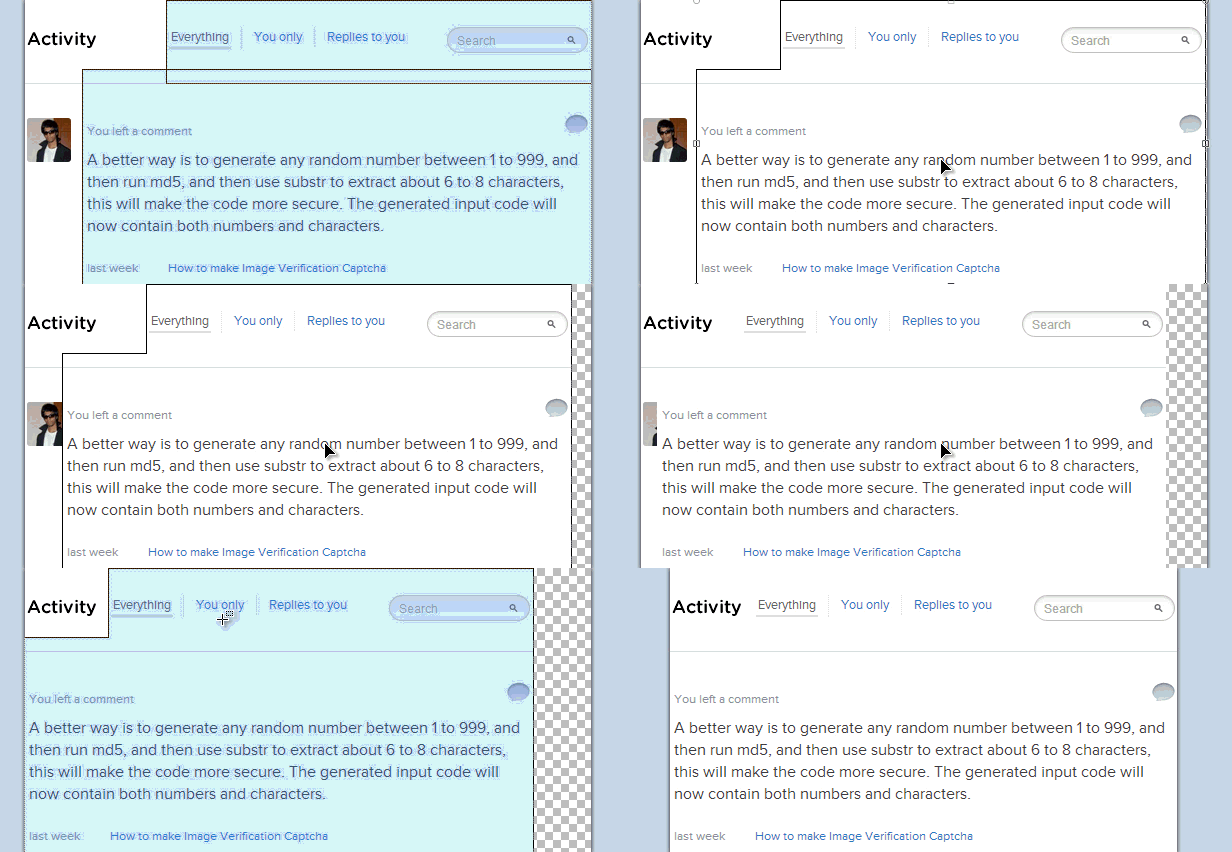
Original Screen shot but it is 981px in width
Now, no text in the image is visible, my aim is to re-size it down to less than 700px.

Re-sizing screenshot

  1. Open the image in Paint .NET.
  2. You are required to use only three tools, Rectangle Select (shortcut key S), Lasso Select (shortcut key S twice if on any tool except rectangle select), Move selected Pixels (shortcut key M).
final resized image
Final Result Rendered 622 px wide from 981px
As you can see all the white-space is gone, and some not very important components have been cropped off.


area to be removed
Original with highlighted area to be removed
What is removed-
  1. Information is parenthesis, erased using eraser.
  2. "Add Site" button removed using eraser.
  3. White-space between "Your Sites" column and the vertical divider removed using rectangular selection and move selected pixels.
blogger resize screen shots
Selecting and moving pixels

Another way of resizing screen shot

All new sites are designed using the responsive css. So, all you need is to resize your browsers size, and then site take screen shot.

Wednesday, 7 August 2013

Get Despicable Me 2 and Pandi stickers for Facebook Chat

| Wednesday, August 07, 2013 | | Be first to comment!

Facebook smiley were used every where in almost every chat. Smiley sometimes, act as mood changer and help you express yourself or your moment in a better way.

get despicable me 2 stickers for Facebook chat
Stickers Store Facebook
Facebook now allows you to make your chat more expressible with your favorite animation movie and cartoon characters. You get to select from a bunch of menu. The available options include, Despicable Me 2, Snoopy, Finch (are a better version of the old smiley), etc. All these will help you make your chat more happening.


The only problem is that, unlike the regular smiley you don't have any simple code to write like :), :D, etc. And as soon as you click on any of the sticker they get posted, it is your choice to place your message first or your sticker first.


By default you will have only the regular smiley and Meep stickers you need to add the rest using the Stickers Store. With Meep (better version of the classic smiley package) you will use the classic smiley only when putting then using the expressions like the above :D, :), :(, etc.

Tuesday, 6 August 2013

Do conversions using Google Convertor

| Tuesday, August 06, 2013 | | Be first to comment!

Doing different conversions are a part of daily usage of many people online or offline. Using phone or smartphone applications are the newer version of accomplishing such tasks but not everybody is interested in downloading and installing apps for doing some conversion for once in a month, sometimes frequency is greater.

With Google you can do a number of conversions. Though this feature has been around from a long time but a lot still don't know these functionality.  The available options are-
  1. Temperature,
  2. Length,
  3. Mass,
  4. Speed,
  5. Volume,
  6. Area,
  7. Fuel Consumption,
  8. Time, and
  9. Digital Storage
Conversion can be done simply by typing in the search bar. For example, if you want to convert a value from Kilobit (Kb) to bytes, then simple type "800 Kb in bytes", as simple as that.

ALSO SEE: Peek inside NYC Restaurants with Google Maps
Meet 10 for 10 Adsense Publishers in HD
Secure Facebook with Trusted Accounts
unit conversion using google
Converting using Google

Currency Conversion

Currency conversions are also possible but they come under the finance part of the Google, and are unavailable on the conversion widget displayed above. The reason is that the conversions listed above are fixed unit conversion whereas the currency conversions are not fixed they tend to change on daily basis. Therefore they can't be placed with the regular unit conversion widget.

Google currency converter
Currency Conversions using Google
Currency can be converted similarly as the unit conversions using the same simple process of typing as a string or sentence. Another example, to convert pound to dollar type in "1 pound in dollars".

Sunday, 4 August 2013

Facebook new Insight for fan page

| Sunday, August 04, 2013 | | Be first to comment!

With every fan page you create on Facebook, you get an admin panel and an insight page too. The insight page lets you have a full detailed analytic data regarding your Facebook page. 

It allows you to track every instance (free or paid), to be tacked down. You each and every posts, you can track reach, posts clicks and likes and comment in details with numeric count and charts.
New Facebook insights for fan pages
Click to enlarge: Recent posts reach & engagement details

This interface is still available in beta phase and it is required that you must be using Facebook as "you" not as your page.

Get New insight

  1. To get the new insight, now.
  2. Log-in into your Facebook account.
  3. Switch to use Facebook as your page.
  4. Now, navigate to Home using the head "Home" menu.
  5. Select "Insights" from the Favorites.
  6. Now you will get a "Try New Insight" button.
  7. Right click and copy the link, you can directly click too but it will show you a message saying you are required to use Facebook as you not your page. And you will have a button saying "Continue as [your name]" but it may not work.
  8. So, copy the link, and then switch back to you.
  9. Now, paste the address in your browsers address bar.
This is required to be done once then you will be redirected to the new insights whenever you will try to access the insights.


Insight option appears on your page
Now, you will get message like the above on your page you don't even require, to switch to use Facebook as your page.


total likes as per each day on Facebook
Total Page likes on each date
The new insight is divided into four main parts namely, Overview, Page, Posts, People. With the new insight you can track when your page loosed a fan or your page was in a way un-liked or disliked. This was not possible before.

You can also track-

Users landing on your page from outside Facebook.
Pages and Tab visits
Posts by other, offers purchased from your page
This one is best, when your Facebook fans are online. This helps you know what is the best times to publish a post an it will reach the maximum number of your fans.
Track by demographics and gender.
Viewers were fans or not.

Monday, 29 July 2013

How to see new likes on your Facebook Fan Page?

| Monday, July 29, 2013 | | Be first to comment!

Having a new like is great, and knowing who liked is even better. See the list of new and recent likes by others on your Facebook brand page. Explore all of them make new admins, explore those who like your content and admire it.

list of new likes on Facebook page
List of recent fans of your Facebook page

How to see new likes?

  1. Log in into your Facebook account.
  2. Switch to your page.
  3. Now click the friends button from the header navigation bar.
Whenever a new like or fan is gained, the person is highlighted in this list. You can access all your fans using this list.


You can also have a look at other Facebook Pages that like your fan page. To do so, 
  1. Click "See All" link in the likes list.
  2. From the frame that opens you have a drop down menu at the top left.
  3. Toggle using the drop down.
other pages that like your brand page facebook
Other pages that like yours
You can also promote any fan to admin from here, but if you do so make sure you know him/her personally and now it is required that you must know their email address to do so.

As soon as you will click the "Make Admin" button you will be redirected to another page from where you can specify a "role". Giving a role means that you are giving the user restricted privileges for your page, like insight analysts can only view the new likes, posts submitted on your page, people talking about, etc.