Tuesday, 19 June 2012

Microsoft launches Surface- Tablet cum laptop

| Tuesday, June 19, 2012 | | Be first to comment!

Microsoft launched it tablet today. And now Windows 8 has its own device to run. It has a detachable keyboard.


There are two versions of Surface. Windows RT version and Windows 8 Pro version.

Tech Spec

Specs Windows RT Windows 8 Pro
OS Windows RT Windows 8 Pro
Weight 676g 903g
Thickness 9.3mm 13.5mm
Display 10.6" ClearType HD Display 10.6" ClearType Full HD Display
Energized 31.5 W-h 42 W-h
Ports microSD, USB 2.0, Micro HD Video, 2x2 MIMO antennae microSDXC, USB 3.0, Mini DisplayPort Video, 2x2 MIMO antennae
Productive Office Home & Student 2013 RT, Touch Cover, Type Cover Touch Cover, Type Cover, Pen with Palm Block
Practical VaporMg Case & Stand VaporMg Case & Stand
Configurable 32GB, 64GB 64GB, 128 GB

Sunday, 17 June 2012

Advantage of creating a facebook fan page

| Sunday, June 17, 2012 | | Be first to comment!

There are a number of advantages that you are free to enjoy after creating a Facebook fan page. In this post I will not be discussing the Pros instead I will provide you with data of what actually happens when you have a page and you manage to get some likes.

Facebook page provides you with an insight option where the page data is automatically monitored and shown to the admin of the page. Now my own facebook page had 176 likes. They may look pretty low but here is what they actually mean. On a general thought low number of total likes means low number of users that you have access to. But the actual number of users accessing are pretty high.


Now just relax and pull out the low number of likes on your page. Relax and have a look on the next figure that shows Friends of Fans.

Friends of Fans- Facebook defines Friends of Fans as The number of unique people who were friends with the people who liked your page. The insight data shown is of a single day and it varies greatly with every new like. All this makes the actual story a bit more different.
People Talking about this- The total number of unique people who have created a story about your page. A story is created when a user does some activity on your page like, liking your page or post, commenting on your page or post, answering any question you asked, responds to your event, mentions your page, tags your page in a photo, checks in at your place, or recommends your place.
Weekly Total Reach- The total number of people who have seen any content associated with your page.

The graphs in itself is enough to get a good amount of insight to your page but still you can go a bit more deeper by downloading the data.

The above image shows the Export button with which you can export your data in chronological order from your Facebook page.
While exporting you can select the date range, data type and file format.
Date Range- You can select the date range to import data.
Data Type- Facebook offers two data types in which you can download your data. They are Page Level Data and Post Level Data. Page Level Data shows data in accordance of net activity on your facebook page including likes, people talking about this, reach, impressions, searches, etc.
File Format- You can download the data in two formats .xls (Excel) and .csv (coma separated values).

Conclusion-

You must create you Facebook fan page from day one. No need to wait for becoming a known brand. As a blogger I can get my blog and blog post exposed and everybody else can do it too. It will increase the visibility. As in above screenshot 183 likes means durect access to 183 and indirect access limit is 66,839. Only 183 likes can get you 75 people engaged and can reach 785 people in only 7 days.

Saturday, 16 June 2012

Run Windows application on MAC

| Saturday, June 16, 2012 | | Be first to comment!

There are hundreds and thousands of application available on web only for Windows. Now, you want to use one but you own a Mac. The solution is now available.
WinOnX lets you install windows application directly on you Mac without installing windows or a virtual machine.
New in version 1.4- 
You can install programs completely separate from each other.
Programs can be launched with different system settings.
Instead of deinstalling programs, you can just delete the appropriate VM.
Rest details are on app store.
Screenshot from Apple store
Watch Demo Video.

  • Version: 1.4
  • Size: 92.8 MB
  • Language: English
  • Developer: Hisham El-Emam
  • © NES Software
  • Rated 4+
  • Requirements: OS X 10.6 or later

Cost- $4.99 available on app store.

What Upgrade blogger needs

| Saturday, June 16, 2012 | | 4 Comments so far

I have been using blogger for a while now. But something really disappoints me and several other users. The story goes like people start their blogs on blogger with a blogspot.com domain and as time passes and the blog moves to success the blog is moved to other CMS like WordPress, drupal, jumla, etc.
I always want to stick to Blogger but some things make me feel to move one day. What blogger's team must do to keep all the users like me on Blogger.

1. Standalone pages

Standalone pages must feature more options, like letting the users to remove the sidebar from every page or selected page. In pages like guest post and contact form do not require you to have a sidebar. They must look clear and free from almost everything. This thing is required most while building a homepage that features maximum content, with or without category. If non HTML user wants to add related widget option. He may go with any tutorials on web. I added LinkWithin. But there is a major problem faced. This related post widget gets added even on the homepage. This makes the home page congested and unnecessarily heavy.
Moreover, this will help a user to have different adsense placements to get higher revenue. 
Layout button- This will take the user to layout of the page where he can remove the unnecessary things from his template, like a sharebar from contact form.
Upload button- Upload a custom template for a page here.
Sidebar drop down selection- A simple dropdown menu that removes sidebar from the template.

2. Custom template for every page

Now this feature makes me feel high if it is included. Let users add custom template to every page or customize individual pages using the html, bloggers customization option and layout. So there will be simple selection and drag and drop available to every page.
When I compared the lines of code of weblogs running on WordPress to that of blogger, I found there was a drastic difference in the number of codes. One page of WordPress showed 450 line of code while Blogger has 2000+ lines of codes.

3. Home Page

A simple dropdown menu that shows all the pages and the user can select any page and make it his home page.

All these pages can be simple HTML pages not the xml ones. These can be successfully used for special announcements.

4. Add a featured Page owner

Blogger has only two types of blog author. Admin and author, a user is unable to give admin like authorities to somebody else without having the risk to get removed by the one who was given the admin authority.

5. Offline blogging Platform

A downloadable official version of Blogger with which a user can write, preview with the template and save blog post while being completely offline. A synchronization button to make it all go live or save as draft.

6. Custom 404 Error message

A custom 404 error page, which a user can manipulate with images and text. Every blogger has something more than an apology to come up with.

7. Spell Checker

Spell checker is available only in American English though there are a number of users who are Acquainted with British English and they find problems using it.

6. Mobile Template

Blogger has mobile template which makes blogger blog easily accessible on smartphones and tablets. Well with mobile templates on your blog looks more like an app which is great features. But there are no menus to navigate. Only blog content is accessible, no access to standalone pages. It would be a lot better if custom mobile template can be uploaded. Recently launched Dynamic View for mobile is a better concept, but custom means pro.
Custom mobile templates will also help user place ads on a better place, which will be profitable to user as well as Google. Currently ad only appears on top.

7. Feeds

Blogger provides feed option, which can be selected from none, short, until jump break, Full and custom. But still there can be a problem for heavy bloggers or multi-author blogs. The feed generated from these blogs reaches to the subscriber everyday. It is not bad but is like flooding. So, an option must be there which lets a blogger select feed delivery from daily to monthly.

I and many other users want to stick to Blogger. Creating best CMS platform is not only about giving the best, it’s about giving every possible freedom to the user.
If you have something that Blogger needs to add then please comment.

Thursday, 14 June 2012

Integrating facebook social plugin in blogger

| Thursday, June 14, 2012 | | 1 Comment so far

1. Log in into your Facebook account.
2. Go to Facebook Developers page.
3. Select the social plugin you want to use. There are eleven types of Facebook social plugins.
The screenshot below is for Like Box Facebook Social Plugin.
Click to enlarge


Put your facebook page URL. And go through the simple edits. There is no special thing in having header. The streams are useful they provide a good number of updates, but they may also decrease you sites loading time.
4. Click on get code and select the code in 2nd box.


5. Log in and go to your blogger dashboard.
6. Select the blog. Layout > Click on Add Gadget> Select HTML/JavaScript.
7. Paste the code obtained in 4th step and save. No need to give title while adding HTML/JavaScript. 
Put this Gadget in your template wherever you like or it suits the best, by simply dragging and dropping. 

What to submit as Tax Information in Google Adsense

| Thursday, June 14, 2012 | | | Be first to comment!

I was on Paypal some days before. It now requires to update tax information. And in that it requires to put your PAN card number. So I thought similarly Google Adsense will also require to give your PAN card number. But actually it will never ask for PAN card number.


What to submit as TAX information?
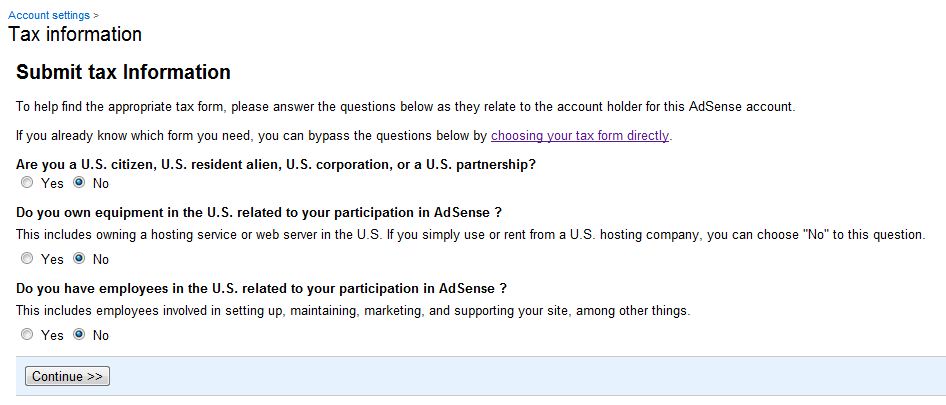
The process is very simple just click on SUBMIT TAX INFORMATION button. It will open up a form that you need to fill up. In that there are two simple steps.


1. The first step involves answering three simple questions.
Click to enlarge
NOTE- If you are running your weblog on free host like blogger then choose Yes in second question.


2. Digital Signatures- You are required to add a digital signature by simply adding name of the publisher. The one who holds the Adsense account.
Click to enlarge
3. Thank You letter- This is not actually a step this is just a thanking letter will be displayed by Google.
Click to enlarge

Wednesday, 13 June 2012

Submit a guest post on b listed blog

| Wednesday, June 13, 2012 | | 2 Comments so far


As a blogger you may be knowing about the importance of submitting a guest post on another's blog to gain visibility and create back links. But your guest post will not be accepted directly in the first attempt by blogs and bloggers that are categorized as the A-listers.
The so called A listed bloggers are Problogger, Copyblogger, etc. So there is no point in wasting time with them in the very first attempt. The problem ranges widely-

  1. No good quality post
  2. No good headline- Your mails never get opened because you fail to create a tempting headline.
  3. Mails never get opened- These bloggers receive hundreds and thousands of mails that include general discussions, problems and guest posts. So the mails are not even opened and they are sent to trash.
  4. Already discussed content- You may be up with a very good post having quality content but the topic discussed in your post is already discussed in theirs so they refuse it. I got two post refused from problogger the same way. But I was still happy to receive a reply.
So here is the B-listed blog to accept you guest post-
Sector Techno- This is my own blog and I discuss a variety of topics here. Below is my niche chart.


The blog is active and carefully managed. I wanted to include other blogs too. So if your blog is good and active then mail me name and link of your blog and a little brief of your niche to me. I will include them too.

Monday, 11 June 2012

how do i use pinterest- ways to use

| Monday, June 11, 2012 | | 2 Comments so far

This is not a tutorial to show how to use Pinterest but this article showcases the possibilities that one can avail while using Pinterest.

Video board

Pinterest is widely known as a virtual pin board and thus is confused with putting images with a virtual pin on a virtual board. I must let you know that you can also pin videos from your website, weblog or directly from YoutTube. The best part to have a video is, it increases the ctr (click through ratio) because of the play button that is displayed as an image.


Catalogue

This is one of the best example you can easily get on Pinterest. The product is easily displayed with price in US Dollars. Any other currency can be used with same effectiveness. With this you can easily introduce your offline and online product(s) to a global market.


Resume

May sound a kind of weird thing but this too is possible. Jeannae Hwang, a Harvard business school graduate, created her resume on Pinterest. Well the concept is simple you require to showcase your skills and an eye catching virtual board is good for that purpose. Moreover, your talent will be liked and repined.


If you feel like there are other possibilities then let me know. It will be added in the post.

Saturday, 9 June 2012

Get traffic from Russia and other countries

| Saturday, June 09, 2012 | | Be first to comment!

I have been blogging for a long time. And maybe even you. After publishing post after post I realized that the major traffic came from USA and India. I thought that people of these two country used internet much more than others. It was a hard thing to believe though. How can such advanced countries be low profile net user.

So, here is the answers not every country uses Google, Bing and Yahoo. There are other search engines that are in their own language used by the people of that specific country. Like Russia uses Yandex, China uses Baidu, etc.

Now what is the solution to get even those users redirected or reach to your website or weblog via searches. It is simple try to index or submit your weblog sitemap to other search engines also or order them to crawl your's.

Dominating websites map by webempires


As you can see the above map it is very clear that Google dominates a major part of the world but still Yandex dominates entire Russia. So there is nothing bad to get your website shown in their search results.

How to do it?
The answer is - READ MORE

Thursday, 7 June 2012

4 Phone Accessories that you Never Knew you Needed... Until Now

| Thursday, June 07, 2012 | | 1 Comment so far


Source
There are hundreds of new mobile phone accessories developed every year, most of which seem to be a load of useless rubbish. However, there are a few things that appear on the market that stop you in your tracks.

“How could I have lived before this?” you wonder, “Why was this not invented eons ago?” you ask. Well, my friends, we will just never know – all you can do is cease asking, and start buying.

So, here are the top five phone accessories you never knew you needed until you read this post (sorry).

PhoneSoap

Did you realise that one in six mobile phones actually have faecal matter (poop!) on them? And the average phone has 18 times more bacteria than a public loo door handle? If that isn’t enough to make you throw up in your mouth a little, I don’t know what is.

However, the genius idea that is PhoneSoap has come to the rescue. This gadget is actually a little box that you place your phone inside to clean (and it’ll charge it too). It works by transmitting UV light from of the top and bottom of the box, destroying all the bacteria on the phone, and it only takes around 5 minutes. My OCD side is jumping for joy right now.

IRIS 9000 Voice Control Module

If you have an iPhone4, you’ll know that Siri comes with a love/hate relationship. Love the idea, hate that you have to be holding your phone right to your face for it to work right. Well, never fear, the IRIS 9000 is here. Now, you can control Siri from across the room.

All you need to do is press IRISs tiny remote button, and just let Siri know what you want – the microphone in the module will pick up your voice, and will amplify Siri’s as well. Great if you want to change the track from the other side of your bedroom, or know if you should grab an umbrella before you run out of the door.

Freeloader Pico Solar Charger

This nifty little gadget does exactly what is says on the tin – charges your phone (or IPod, MP3 player or GPS) using the power of the sun. It’s small, lightweight and comes with a myriad of adapters to provide you with power whether you’re trekking through the Amazon, or on the bus home. You can also cheat and charge the Pico via USB cable before you leave the house, so it doesn’t even matter if it’s dark.

ILaunch Rocket Launcher

Need to strike fear into the hearts of your... co-workers? Well, the ILaunch Rocket Launcher is for you! Fire foam missiles from your iPhone or iPod touch up to 25 feet to keep your peers at bay, and claim 1,400 square feet of the office for yourself.

You control the missiles wirelessly via Bluetooth, using a touch activated app – so you don’t even have to be at your desk to operate it. Repeat after me: Bwahahaha, this office will be MINE!
Jasmine Ayres is an avid blogger and tech guru, and writes regularly for Vicorp, a provider of VMXL editor packages and excellent VXML examples. Her specialist subjects are phones and voice recognition for both business and personal use.

Top 5 Small Business Web Design Tips

| Thursday, June 07, 2012 | | 9 Comments so far

If you are a small business building a website, then budget is crucial. It is not always easy to build a website on a budget, although a few “make-or-break” design elements can promote an affordable and successful small business website.  Whether you wish to design your own site or hire a professional, pay attention to these helpful tips and build a winning website without breaking the bank.    

Tip #1:  Make sure your site loads in 5 seconds or less.

Online users take only a short moment to decide whether to stay on the page or migrate to another one.  If your small business website takes 10 to 20 seconds to load or more, then you can expect a high bounce rate.  Remember that users have short attention spans and very little patience.  Make sure that the purpose of the website can be easily understood within the first 5 seconds of viewing it and visitors should start exploring the deeper and more complex pages.

Tip #2:  Limit the menu bar to 5 options.

Two key elements motivate visitors to explore a website – purpose and appearance.  It is critical to define the purpose of your small business website as singular and to reflect that purpose in the overall appearance.  Try to be all things to all people and you will ultimately be of value to no one.  At the cornerstone of website simplicity and focus are the navigation and menu options.  Limit the menu bar to five options and make sub-menus only when necessary.  Remember to make sub-menus available only after the user selects one of the five main menu bar options.

Tip #3: Make a clearly visible call-to-action.

Think of your website as the showroom at IKEA.  IKEA’s non-traditional layout successfully leads customers from one section to another in a style that allows you to look around freely.  From the furniture displays to the multiple cash registers and right on through the food goodies, IKEA makes it abundantly clear what it wants visitors to do while in the store.  The IKEA layout is the perfect model for which to set up your website.  Guide visitors with calls to action, which could involve contacting the site administer, ordering a product or service, adding a comment or performing any other website action.  Always ensure that every call to action is easy to spot both textually and graphically from anywhere on the site.

Tip #4: Provide free and clear access to additional help options.

You never want to lose sales, visits or any online goal due to unanswered questions.  Always assume that visitors will need help on every page of your website and make it as easy as possible for them to access that help.  Just as with your calls to action, make it clear that visitors can find help via phone, e-mail, live chat, call back, user forums or knowledge databases.  You can also prioritize the various help options so that visitors can easily locate the best one available for the particular question.

Tip #5: Show consistency among other design elements.

The look and feel of your entire site is essentially a combination of its individual components.  Pay close attention to even the most minor details to ensure a level of consistency.  Start by making sure that all messaging on the website is readable.  Use appropriate colors and graphics and pay close attention to font size.  You also want to ensure that every image looks crisp and appealing.  Remember, even a minor component can form the basis for whether a visitor decides to stay on your website or migrate to a competitor.
Akesh Gupta is President of Light Speed Solutions. Light Speed Solutions offers quality web design services on time and on budget. 

Wednesday, 6 June 2012

Temple Run

| Wednesday, June 06, 2012 | | Be first to comment!

If you spend a lot of time either online or on your cell phone, chances are that you are familiar with some of the apps you can download for the iPhone. There are so many out there that you can choose from, but not all are created equally. Everyone likes to have a little fun from time to time, so you probably have a few games downloaded on your phone as well. Have you ever heard of Temple Run? If you haven’t, you’re really missing out and the great thing about Temple Run is that it is a free app! That’s right! Here’s the 4-1-1.

About the game

Temple Run is a new game that you can download on your Apple iPhone and Android devices from the respective app store for free. The game isn’t hard. It just takes concentration and a lot of patience. What do you do in Temple Run? Temple Run starts out with your character taking an Idol and running from villainous monkeys. These monkeys want to catch you so you have to be sure that you always watch your step and your back. When you first start out, the game moves fairly slowly. You will be able to tilt your phone to the left or to the right to move your character in the right direction. 

Along the way, you will want to collect coins, because these will be beneficial when you want to purchase upgrades or new characters. The more coins you collect, the better. As time moves on in the game, the screen will move faster and faster. There are obstacles that you must avoid as well. You will need to jump over small tree stumps because if you do not and you trip, the monkeys will gain on you faster and you will have to run faster to get away from them. 

You must be sure to jump completely over the larger tree stumps because if you do not, you will die. You will need to duck under trees as well as under barbedwire fences and flaming fences. You will have to navigate over small, crumbled bridges and you will have to be able to jump from location to location all while running from the monkeys. There are many upgrades in Temple Run as well.  All those coins that you collect will allow you to purchase new characters. There are six in all. You can also purchase boosts, coin magnets, invisibility powers and even resurrection powers to continue your game if you should die.
The game has received 4.6 out of 5 rating in Google Play store. It requires Android 2.1 and up.

Conclusion 

Temple Run is a really fun game to play in your spare time. It can turn into an addiction if you play it too often because you will constantly want to beat your high score. Because Temple Run can turn so fast paced, it may make you a bit nervous and it may make your eyes go buggy. Remember that it is just a game and it is not life. If you’re bored, download Temple Run and give it a try!
Author's Bio: Norm Richins is a writer for BecomeaPoliceOfficer.com. He helps students find the best online programs to help them become a police officer.

4 Common Sense Parenting Tips for the Computer Age

| Wednesday, June 06, 2012 | | 1 Comment so far

Internet parenting tips
Parents have always worried about their children, but modern parents have additional concerns to occupy them. With the wide spread use of cell phones, computers and social networking sites, parents have a whole new set of problems to protect their children from. Yet, technology can also be a valuable tool to keep children safe from traditional fears as well. Here is a list of common sense tips to keep your child safe in the computer age.

Internet Supervision

Whether your child is six or sixteen, monitoring his or her internet activity is crucial to preventing your child from being taken advantage of by online predators. The first key is making sure that you have access to any social networking profiles or games so that you can see who your child is speaking with online. You should also teach your child to never reveal personal information over the internet. Profiles on sites like Facebook are a goldmine for potential predators. Make sure your child isn't giving away too many details.

Safety and Technology

You can use a number of technological solutions to keep your children safe. If you child is old enough to carry a cell phone, many can feature apps that a child can use as a personal alarm that will alert you and call 911 if her or she feels threatened or if he or she is in a dangerous situation. Apps like Silent Bodyguard send out an alert to your child's contact list in case of an emergency.

Sports and Recreation

As summer comes ever closer, many children will fill their days with a variety of sports activities. Talk to your kids about the real dangers inherent in these sports. Some kids spend so much time video gaming that they don't realize they can truly be hurt. Be sure that your child has the proper equipment for activities like helmets for biking and life jackets for boating and water-skiing. Pools can be a source of danger for all children. Any child under the age of sixteen or a child that is not a strong swimmer should be supervised by an adult at all times. Small children should never been left unattended around pools, even if they are not swimming.

Stranger Contact

You have probably already told your child about the danger in talking to strangers, but you may need to redefine the role of stranger for online activities. Kids may not realize an online person they have been interacting with for a long time is just as unknown as someone they have never met before. People that mean to harm children can be very convincing, so you need to reaffirm that your child understands that it is only okay to speak to strangers when you are there to supervise.
Worry is a part of parenting, but new concerns about how to protect children in the technology age can be overwhelming. In general, using common sense and teaching children to be cautious can do a lot to help keep him or her safe. AuPair.org has more helpful tips and can help you find a trustworthy caregiver for your kids.

Monday, 4 June 2012

When Being a Guest Matters – Top Reasons Why Marketers Should Include Guest Blogging in Their SEO Efforts

| Monday, June 04, 2012 | | Be first to comment!

Staying Ahead of the Competition Through Guest Blogging

To stay ahead of your competition online, it is important that you market your business in every channel available. You have probably tap into social media and  it is also likely that you have created your own blog and add content into it on a regular basis to improve your website's traffic. However, are you aware that you can also improve your website's rankings on SERPs through guest blogging?

Guest blogging, or guest posting as other would like to call it, is a simple approach that involves writing useful and compelling content not for your own site or blog but for someone else's or vice versa. Whether you invite another blogger to write a post for your website or you write a content for another person to publish on his or her site, the key to guest posting is sharing content that is relevant to  the audience.

Although this is a fairly new practice, many marketers and bloggers alike are seeing the value of guest blogging when it comes to improving their website's traffic and ranking. Of course, you're probably asking “why would I want to give away the content I wrote to someone else?” The reasons below will shed light on why you should include guest posting in your marketing arsenal.

Broaden Online Relationships and Open Up Opportunities for Cross-Promotion

As a business owner, you are probably aware how important networking is for your brand. Guest posting opens up numerous opportunities for you to build your network and for you to establish a strong working relationship with industry bloggers. If you are able to contribute relevant content to different industry blogs, you can be assured that blog owners will be grateful for your valuable contribution on their sites. Along the line, you can be able to leverage on the relationship you have built and it would be easier for you to ask them to write a review or promote your brand and you can do these things to them as well.

Breathe New Life on Topics

If you frequently write content for your own website, it is likely that you have occasionally experienced writer's block. The same thing happens to bloggers as well. Every once in a while, marketers who write their own content have trouble coming up with fresh posts or putting a creative spin on a subject that they have been writing about for a long time. By guest blogging, you will be able to inject new life and perspective into industry blogs. The more relevant your posts are, the higher the likelihood that blog owners will ask you to continue guest posting for them in the future.

Obtain Backlinks

Any online content marketer knows how important backlinks are to get higher search engine rankings. When you do guest posts creatively and intelligently most blog owners are likely to let you to include a few links in your author's bio section, or if you have a good relationship with them they may also let you drop a few more links on the content itself. As a result, if the blog owners  generate more readers to their site, the backlinks will ensure that you get more traffic on your site as well. Basically,  it's a win-win situation for you and the blog owners.

Expand Your audience

Of course, when you write a guest post on another blog, an entirely new audience would be able to read your content. The post you made becomes the channel for you to showcase your knowledge, expertise and industry authority, which in turn will attract more readers. With the right techniques as well as consistency, you can turn most of your new audience to regularly follow or read your posts.

Fuel Your Social Media Campaign

If you have been marketing on social networking platforms for your brand, you should be aware that just like SEO, social media thrives on content. As such, when you are writing creative guest posts, the more likely that people will share, like, comment, tweet and +1 your content. Nonetheless, you would be able to spark conversations, which in turn will make others to become interested on your brand. Whenever your content gets shared on various social networking platforms, search engines would be able to pick the signals, telling them that your content is valuable, which in turn equates to higher ranks in SERPs.

Guest blogging is an excellent trade-off that lets you establish excellent relationships with industry experts, showcase your credibility and authority, garner you a new audience and, in general, help you with your brand's marketing efforts. Now that you know what guest posting can do for you and for your business, it's about time that you take advantage of it  and include it in your marketing arsenal.
The article was written by Robert Kirk who runs a  Search Engine Optimisation company in Scotland, UK. RFK Solutions also carry out website design, ecommerce and printing.

5 Best iPhone Games for Hardcore and Casual Gamers

| Monday, June 04, 2012 | | 1 Comment so far

There are a lot of iPhone and iPod Touch games available in Apple’s App Store which makes hunting for the best games difficult. This article may serve as your guide in choosing the best games from thousands of available games. We scoured the App Store hunting for adventure games, cool brain-twister games, and shoot-everything-that-moves games to narrow down our huge amount of selections.

Before deciding of buying or downloading some free games for your iPhone, you should consider the fact that playing games will somehow lessen the battery life of your device. But there are different tips and tricks that will solve your problem about battery life, just use the power of Google in searching those tips and tricks.
Please be reminded that iPhone app developers and sellers bargain their applications with discounts from time to time. The price that we include here may not be the actual price once you visited the app store.

Are you ready? Let’s have a break and you may play the game of your choice right into your iPhone or iPod Touch.

Here are the 5 best iPhone games you can buy from the App Store:

1. Real Soccer 2009

Publisher: Gameloft S.A.
Price: $1.99 (full version)/Free (lite version)
Age rating: 4+
Real Soccer 2009 offers awesome gameplay and outstanding graphics; it's a must-have game-app for soccer fanatics, whether extreme gamers or casual players of this genre. The app renders on-screen controls that you can manage to perform varied tricks with the players in a span of 15-minute gameplay. Local Wi-Fi multi-player option enjoins Real Soccer 2009 in the Major League. If you want to try before deciding to buy this game, consider downloading the free lite version of the game.

2. Strategery

Publisher: Affogato LLC
Price: $1.99 (full version)/ Free (lite version)
Age rating: 4+
Eventhough this game looks pretty simple, Strategery is a strenuous game of invasion and defending strategy. You may try playing it at any of 4 difficulty stages, for about 20 to 30 minutes or for about an hour (warning: this game is surreptitiously addictive), single player or with up to five gamers in pass and play mode. Strategery naturally saves your current game and keeps a record of your win/loss statistics. If you want a no-risk test drive of the game, you may opt to get a free lite version.

3. Zen Bound

Publisher: Secret Exit Ltd
Price: $4.99 (full version)/Free (lite version)
Age rating: 4+
If the concept of enclosing rope all over a woody sculpture for enjoyment hooks you like crazy, then be prepared to be astounded. Zen Bound was able to make a practically boring action to become a fascinating challenge. This is best for casual gamers and is excessively tactile and features 3-dimensional graphics that bagged an award from the International Mobile Gaming Awards. In addition, Zenbound has a pacifying ambient sound effect composed by Ghost Monkey.

4. iDracula - Undead Awakening

Publisher: Chillingo Ltd
Price: $2.99 (full version)/Free (lite version)
Age rating: 4+
For hardcore and casual gamers, shooting-at-anything-that-moves is the right pastime activity. If you are one of those types of gamers, you'll seemingly stumble upon a natural (or supernatural) fondness for iDracula. With inherent controls, well-designed graphics, and an amazing soundtrack, iDracula will motivate you to slay monsters as quickly as possible.

5. Rolando 2: Quest for the Golden Orchid

Publisher: Ngmoco Inc.
Price: $5.99 (full version)/Free (lite version)
Age rating: 4+
Rolando 2: Quest for the Golden Orchid is the most anticipated series of the popular game Rolando. The follow-up game will give satisfaction to all players. Gamers use the iPhone's accelerator and its multi-touch features to control the movement in order to complete 45 levels. Rolando 2’s amazing visuals were developed by pop culture artist Mikko Walamies, and its sound effect comes via Mr. Scruff.
These are just some of the games you can buy or download for your iPhone or iPod Touch and if you want to explore for some more games, just visit the official store – the App Store.
This is a guest post from Rolando Ferriols. He loves to write technology and gaming articles. His latest contributions are about the latest RPG from Blizzard on the following websites - http://diablo3questsguide.com and http://www.buydiabloiii.us.

Sunday, 3 June 2012

5 Apps for Members of the Military

| Sunday, June 03, 2012 | | Be first to comment!

Whether retired, on leave or on active duty, those in the military continue to work hard for our safety and our freedom. Though active duty members do not have much down time, when the find the chance, they turn to smart-phones and tablets as a way to stay connected with friends and family.

But the use of smartphones and tablets for the military can now far exceed the simple use of staying in touch. Thanks to certain apps, military members can now use their smartphones and tablets for their job functions, to learn more about new team members and to even put their uniform on correctly. The following are five apps designed for military personnel.

1. Soldier's Guidebook

If you find yourself on leave or on active duty, Soldier'sGuidebook is a military necessity. This app can help you keep track of a variety of necessary information.
For starters, the app features an Army Physical Fitness Test (APFT) calculator, which contains an extended scale and provides you with the ability to keep track of all of your past scores. The app also features a body fat calculator, which allows you keep track of all of your body fat percentages.

The Soldier Bios feature allows you to keep track of all the important information about your soldiers. Along with their name, you can also add a photo, height, weight, rank, important dates, scores and more.

The Knowledge feature provides you with information to help you study. It contains over 35 subjects, and you can easily have access to information to help you brush up on a variety of subjects.

The Weapons and Vehicles feature allows you to reference any weapon or vehicle used by the Army. Along with basic information, you will also receive specs and images.

2. iCorps

If you're a Marine, iCorps is a tool that you need. iCorps allows any member of the Marines—past, present and future—to stay connected with each other. You can learn about new members of your team or read up on retired members.

3. Tactical NAV

There is no better way to be prepared than with the use of TacticalNAV. This app provides you with access to field navigation and the military grid reference system (MGRS). No matter where you need to navigate, this app will help, enabling you to stay safe and on target.

With Tactical NAV, you can easily map out enemy targets, plot your attack and even take photos of navigational points to help you remember where to go and how to get there. If you're working at night, the app allows you to switch to night mode.

You don't have to worry about wrong results or lost signals either, as Tactical NAV was thoroughly tested and proven to work in the most combative areas of war. You can even share your waypoint and location via email.

4. Military Traveler

The purpose of MilitaryTraveler is to provide those in the military with easy-to-access information about the facilities located on base. The app will provide contact information on banks, fitness facilities, retail locations and child care, to name a few. Currently, all bases are included on the app, but since the app is relatively new, some bases will contain less information than others. This app is great for those in the military who were recently sent to a new location and have no idea where anything is. Rather than get lose, let Military Traveler help make you more accustomed to your surroundings.

5. Uniformity

The uniforms of navy personnel can be confusing. Some uniforms are hardly ever worn, making it frustrating to figure out exactly what piece goes where. Rather than guess, Uniformity can help ensure you're dressed appropriately.

Through the app, enter your gender, rank and other basic information, and you will be presented with the correct way to wear your uniform.

Every Navy rule on dress code is contained in Uniformity. From badges to medals to name tags and everything in between, all formal and casual uniforms have complete instructions on proper appearance.
Philip Jones works with new robotics technology and enjoys freelance writing in his spare time.  He often covers a variety of topics including technology and social media.

Friday, 1 June 2012

Job Seekers Creating Resumes On Pinterest

| Friday, June 01, 2012 | | Be first to comment!

Traditional resumes may not be a thing of the past quite yet. However, many enterprising and creative job seekers are using the popular social media site Pinterest in order to showcase their special skills, qualifications and job experience to prospective employers.  Pinterest is based on graphics which means that individuals can enhance their resumes with eye catching infographics, photos and even videos. Is this really an effective way of finding a job? Or is it just a mere fad? Let’s take a look at how some job seekers are using Pinterest in order to market themselves online.

Harvard Grad Creates One Of A Kind Resume  

Who would have thought that it would be possible to solicit for a job and create a resume with Pinterest? Jeannae Hwang, a Harvard business school graduate, did just that. Jeanne created boards showcasing her assets, skills, and personal hobbies with the purpose of getting hired at Pinterest.   Some of the images are linked to her Tumblr blog with a detailed explanation of the image at hand. Jeanne isn’t the only person to make use of Pinterest in order to create a resume. Other users have found rather creative ways of using the site in order to create creative and one-of-a-kind resumes.

Visuals Are Key

Since Pinterest is a visually oriented site, it is the perfect way for users to showcase their portfolio and work. Photographers could possibly create a board showing off their most striking photos while web designers could pin their most creative and compelling works. Individuals who are looking for jobs in marketing, social media or any visual medium could benefit from having a Pinterest style resume.  

Pinterest Job Resume Tips

You may want to create different boards highlighting your past experience, qualifications and education. For example, if you attended a military university you could create a board with images of the school grounds or one featuring extracurricular activities you were involved in. You may also want to create a board that showcases your personal interests and hobbies in order to lend your resume more of a personal touch.  
Creating a creative resume on Pinterest won’t guarantee a job by any means but the fact is that you never know for sure until you try. At the very least it will make job hunting a bit more fun and allow you to use your creativity. If you create something truly unique it is almost certain to get repinned and could possibly go viral and lead the way to more opportunities .
Written by Janalise Starr - Janalise is an avid social media user and marketing and branding expert. She currently resides in Southern California.

Can Technology Help You Get A Better Night's Sleep?

| Friday, June 01, 2012 | | Be first to comment!

According to a statement by the Agency for Healthcare Research and Quality, up to 70 million people in the United States may have sleep disorders. Depending on the severity of the disorder, those affected by sleeping disorders may have their daily rest interrupted several times per night.
In addition to sleeping disorders, the quicker pace of life today can be another culprit which robs us of rest. And some of today's technology doesn't help; being able to take our personal devices everywhere can mean that they and our brains don't get turned off when it's time to rest.
The internet is a great resource to research this difficult, widespread issue.  You can check out these various solutions online to see which one makes the most sense for you.

Pharmaceutical Solutions

While there are many products available over the counter to help with sleeping disorders, there are also warnings. Some prescription sleep medications have been flagged by the FDA as having serious side effects, such as allergic reactions, unorthodox behavior while sleeping and even symptoms ranging from mild nausea to serious emergency room-worthy conditions.

Natural Solutions

Natural supplements form sleep issues are now available in almost every natural health store. Herbs like Valerian, Chamomile and Kava all have benefits which can result in a sound sleep. But using herbal supplementation also has its risks; as certain combinations can be deadly. In addition some herbs, while beneficial in the short term, can cause long-term damage to major organs such as the kidneys.

Technology and the Improvement Of Sleep Quality

Some sleep disorders require a night or two out of the home so that your sleep can be monitored. But did you also know that there are apps available which allow you to track your sleep from your smart phone?

Sleep Cycle and Sleep Bot Tracker

Each of these apps are available at one dollar and no cost, respectively. Both allow for the tracking of your movements during sleep by setting your phone's alarm, and then placing it under your pillow. There is some work required on your part, as you will have to use the information the apps record to discern what occurs during which phases of sleep you happen to be in. But they also provide information that can offer a great jump-off point to researching how you can sleep better.

SleepPhones

If you deal with a partner who snores the night through or need some kind of background noise to help you fall asleep, SleepPhones could offer a solution. Instead of creating noise that can disturb the sleep of others, SleepPhones offer a way to eliminate outside noise. This product is actually a headband which includes earphones which are inserted through the inside. The cord for the earphones is directed to the back of the headband to ensure safe sleeping. SleepPhones can be plugged into an .mp3 player, iPad or any device which has a 3.5mm headphone jack.

WakeMate

Another gadget to help improve the quality of sleep is the WakeMate. This device wraps around the wrist and can be recharged via a USB connection. Data is collected by the wristband as you sleep, and can then be synced with your Blackberry, iPhone, Android phone, iPad or tablet when you awake. The WakeMate includes its own free app which will upload your sleep data. Simply create an account at the site, and then log in to view the detailed analysis you'll find there.

Choosing Your Sleep Tech

Which form of sleep technology you choose will depend on what you are most comfortable with, in addition to which sleep disorder you think you may have. Reading online reviews about products from those with the same symptoms you are experiencing can help you avoid paying for personal sleep technology that may not work for you.
Citations:
Guest blogger Ruth Suelemente writes about a variety of technology-related topics, including how your high speed internet connection can be used to research all sorts of issues.