Sunday, 26 January 2014

How to put some Facebook friends online or offline?

| Sunday, January 26, 2014 | | Be first to comment!

You some time want to control your chat availability, on Facebook. Turning off chat for everybody, just to turn of chat for some friends is useless. At the same time turning on chat for everybody, when you want to chat with only selected friends, is also useless.

turn Facebook chat online or offline

Advance Settings allows you to control the entire friend list at once. You can also use the list for quick select and deselect. For example, in the above screenshot "Close Friends" is a chat contact list.

ALSO SEE: Facebook adds trending topics

How to control chat options?

  1. Advance chat settings can be accessed by "Options" button at the bottom of chat list.
  2. Click "Advanced Settings".
control your advance chat settings in Facebook desktop
Advanced Settings

Author's Bio: Shubhashish Shukla (follow him) is the person behind Sector Techno (twitter, facebook), a technology blog. An always learning web developer.

Thursday, 16 January 2014

Facebook adds trending topics

| Thursday, January 16, 2014 | | | Be first to comment!

Another great functionality from Twitter is now available on Facebook. Facebook, recently rolled out trending topics that are displayed alongside of your Facebook newsfeed. The stories shared publicly are visible on the Trending.


But the fact that all the people don't share things publicly retards the trending. As the trending only contains public posts. For, now it is quite clear that maximum trending topics are from news pages or other such pages. The country of the user is also taken into consideration.

These trending feeds are customized by user interest. It is also possible that Facebook will start to place promoted post in the Trending section.
Trending topics on Facebook newsfeed

This will make Facebook a better stand for news digests. And will surely increase the engagement rate dramatically. The last Facebook hashtag, release is still not used by the majority of Facebook users.
Aam Admi party on Facebook trending

Facebook is testing the mobile version of this feature. Trending is not available to everybody. The feature will be rolled out for a number of countries in the next few weeks.

Author's Bio: Shubhashish Shukla (follow him) is the person behind Sector Techno (twitter, facebook), a technology blog. An always learning web developer.

Sunday, 5 January 2014

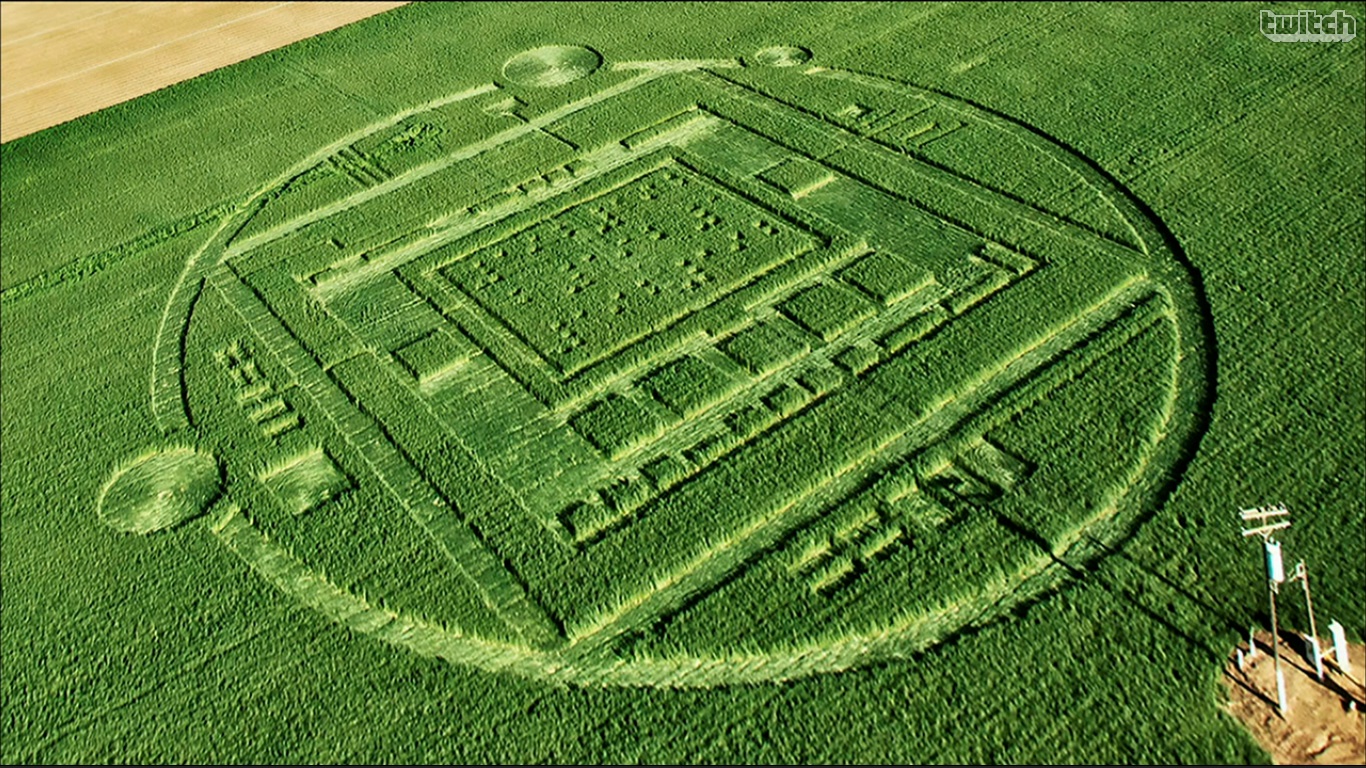
NVIDIA created crop circle to promote its Tegra K1 processor

| Sunday, January 05, 2014 | | Be first to comment!

NVIDIA, is prepared with its new Tegra K1 processor, that is reported to have 192 graphics core. NVIDIA tried to pull the graphics processor market with this new product. The graphic cores of this processor use the same Kepler architecture, that are used in the world's most powerful supercomputers.

To make the crop circle more relevant, the artists placed number 192 in Braille at the center of crop circle. The number 192 represents the graphic cores.

nvidia crop circle for tegra k1 processor promo

To get better market focus, and great publicity. NVIDIA used a whole new way to promote its Tegra K1 processor, by creating a crop circle.


Author's Bio: Shubhashish Shukla (follow him) is the person behind Sector Techno (twitter, facebook), a technology blog. An always learning web developer.

Thursday, 2 January 2014

How to put twitter timeline, favorite, list, search and custom timeline on blog?

| Thursday, January 02, 2014 | | Be first to comment!

Growing twitter following, or to increase the customer engagement. Twitter timelines enables your users to be able to reply, retweet and follow directly from your website or blog.

Embedding twitter widgets

Embedding a twitter timeline, favorite, list, search or custom timeline on blog is easy-
  1. Log-in into your twitter account.
  2. From "Settings and help" go to, "Settings".
  3. Navigate to "widgets" and click "create new" button.
The screen below will show up, enter twitter handle of the user whose tweet you want to display, it could be any user on twitter.
developer twitter timeline for blog or websites
user timeline on twitter
After selecting the appropriate options, hit "Create widget" button. Your widget will be created and the codes to implement it will be generated, copy and paste it where you want it to be displayed.

Once created all of the widgets, will be saved in your widgets tab you can use the code, again from there or edit the already created widgets.

To put it on blogger,

  1. Log-in and select the blog to put the widget.
  2. Navigate to "Layout".
  3. Hit "Add a Widget", select HTML/JavaScript.
  4. Paste the copied codes, hit save and you are done.
Similarly all other widgets can be selected and displayed on your website or blog.

Author's Bio: Shubhashish Shukla (follow him) is the person behind Sector Techno (twitter, facebook), a technology blog. An always learning web developer.

Sunday, 29 December 2013

Report to Facebook when you are tagged in copyrighted uploads

| Sunday, December 29, 2013 | | | Be first to comment!

Facebook, respects copyright laws. But when any platform allows you to share media like pictures, videos, etc. then it is quite hard to keep a track on the media shared. So, it is quite possible and easy to share copyrighted media, on Facebook.


Reporting content like these, requires users concern. Any Facebook user can report whenever, he/she encounters a copyrighted media. To do so,
  1. Go to your activity log from timeline review.
  2. From there hit hide post, 
  3. After the post is hidden it will ask you to report/remove tag, click it.


From the pop-up that appears click on, "Is this your intellectual property?" at the bottom.


Select "Report this to Facebook as a legal rights infringement. And hit continue. Facebook also allows you to contact a designated Facebook officer using the traditional but slower methods,

Facebook, Inc.
Attn: Facebook Designated Agent
1601 Willow Road
Menlo Park, California 94025
650.543.4800 (phone)
650.560.6293 (fax)
ip@fb.com
Author's Bio: Shubhashish Shukla (follow him) is the person behind Sector Techno (twitter, facebook), a technology blog. An always learning web developer.

Monday, 23 December 2013

Gmail, Files not attached notification

| Monday, December 23, 2013 | | Be first to comment!

An amazing Google email feature. Whenever you want to send an email with an attachment, and you have written in the mail content, a message like "I've attached" then your email will be scanned for any attachment, if you do not have any attachments attached then a JavaScript pop-up will open to alert that your email lacks attachment.

compose email on google plus
Attachment not done
So, this is a small but great feature that gmail offers, which prevents users from forgetting the attachment. There could be more of these measures.

Author's Bio: Shubhashish Shukla (follow him) is the person behind Sector Techno (twitter, facebook), a technology blog. An always learning web developer.

Sunday, 22 December 2013

Assemble a computer from scratch with Kano

| Sunday, December 22, 2013 | | Be first to comment!

Kano a start-up project funded by KickStarted. Kano aims at helping people of all ages to learn more about computer and coding skills.
kano inside the box components
Launched as a kickstarter project with aim to raise $100,000 but the project successfully raised $1,522,160. The Kano computer is powered by Raspberry Pi (a credit card size computer board), which comprises of
  • 8 GB Micro SD
  • Micro SD Card adapter
  • Chicklet Keyboard
  • Optical Mouse
  • 1 AMP Power Supply
  • HDMI Cable
  • Micro USB Cable

The team also developed Kano OS and Kano block that let users create code blocks and then finally output the code blocks into JavaScfript and Python codes more programming languages will join soon. Kano in the box,
  • Kano Books
  • Kano OS and Levels on 8 GB SD card
  • DIY Speakers
  • Raspberry Pi Model B
  • Kano Keyboard Combo
  • Custom Case
  • Card mods and stencils
  • Stickers
  • HDMI and Mini-USB cables
  • Power Plug
  • WiFi powerup


Author's Bio: Shubhashish Shukla (follow him) is the person behind Sector Techno (twitter, facebook), a technology blog. An always learning web developer.

Saturday, 21 December 2013

Create custom sized Adsense ad units

| Saturday, December 21, 2013 | | Be first to comment!

Google Adsense recently rolled out 'Custom Ad Size' option, that lets users create ad units with various sizes as per publishers requirements. Till now, every user was bound to use, ad sizes from four predefined ad size category namely,
  • Horizontal
  • Vertical
  • Square
  • Link Units
Now, adsense user can select 'custom ad size' and place in their own size and adsense will generate the codes for that size for you.

How to create custom ad size ads?

  1. Login in into your Adsense account.
  2. Navigate to 'My ads' tab and click 'New ad unit' button.
  3. Select 'Custom ad size' option from 'Ad size' dropdown menu.
In case you have created an image ad unit or image/text ad unit, then the image ad will display and image ads are of fixed sizes. So, any image ad will adjust itself by aligning to the center. But,

adsense ad unit problem
The above one, is a custom size ad unit, with an image ad that is smaller in height and width. Now, the image ad gets aligned to center horizontally but leave blank white space vertically.

Existing Ad units

If you already have ad fixed sized ad units, they cannot be converted into 'Custom Ad Size' ad unit, you are required to create a new ad unit and the select 'custom ad size'.

Author's Bio: Shubhashish Shukla (follow him) is the person behind Sector Techno (twitter, facebook), a technology blog. An always learning web developer.

Friday, 20 December 2013

Top 5 Entry-Level Laptops With Windows 8 OS

| Friday, December 20, 2013 | | Be first to comment!

It is a completely wise decision you've taken to pay those extra bucks for a laptop loaded with genuine operating system instead of using pirated copies. Undoubtedly, there are a lot of advantages of a genuine version of operating system which we will discuss some other day. For now, let's go check out 5 most popular Windows 8 laptops available in India. 


HP Pavilion TouchSmart 14-B173TU Sleekbook

As the name suggests, HP Pavilion TouchSmart 14 sports a 14 inch touch screen that comes with 64-bit Windows 8 operating system. This laptop has a glossy body made up of plastic material yet it feels comfortable to use. It is powered by a 1.3GHz Intel Core i3 processor; 500 GB storage and 4 GB RAM which could be further expanded up to 8 GB using the additional RAM slot available on board. The 14" LED backlight display has a screen resolution of 1366x768 pixels. The laptop also has a HD camera located above the screen which could be used for video calling and snapping selfies using the laptop. It also has an extra sensitive touchpad which eliminates the need to carry an extra mouse on your backpack.
This touchscreen based laptop from HP weighs approximately 2 kg and has a 4 cell battery which should be good enough to keep the laptop powered for about 4 hours with wireless connectivity turned on. In terms of connectivity options, the laptop supports Wi-Fi b/g/n, Bluetooth v4.0 and connectivity ports which includes 3 x USB ports, Ethernet port, VGA, HDMI and a Mic-in port on the left of the laptop. HP Pavilion TouchSmart 14-B173TU is fairly priced at approximately Rs. 35,500 in India. 

Sony VAIO Fit 14E F14212SN/W

If you are looking for something from a brand endorsed by Kareena Kapoor, then you can check out the Sony VAIO Fit 14E series laptop. The Sony VAIO Fit 14E F14212SN/W is again, a 14" touch screen based laptop that comes with Windows 8 operating system pre-installed. The screen resolution of this laptop is 1366x768 pixels. Though this laptop from Sony has a better and newer Core i3 (3rd generation) processor when compared to the HP Pavilion laptop, it has just 2 GB of RAM in contrary to 4 GB RAM in the HP TouchSmart laptop mentioned earlier. But of course, if needed at a future point of time, the RAM here could be upgraded up to 8 GB using the free RAM slot available on board. The laptop has 500GB SATA hard disk for data storage and comes with common connectivity features such as Wi-Fi b/g/n, Bluetooth v4.0 and connectivity ports including 4 x USB ports, microphone-in, Ethernet, HDMI and a memory card reader. 


The laptop weighs 2.2 kg and priced at about Rs. 36,690 which includes 1 year on-site warranty. 

Dell Vostro 2420

Though, unlike other 2 laptops mentioned earlier, this laptop by Dell doesn't have a touch screen, but if you're a Dell loyalist and looking for something very sturdy then this laptop would prove to be an ideal partner for you. As many of you might know, Dell is known for its study build quality and aesthetic designs. This laptop comes with a 14" HD WLED screen with screen resolution of 1366x768 pixels. An added advantage here is the anti-glare coating on its screen that helps to eliminate unwanted glare and reflections from the screen. 
The Dell Vostro 2420 laptop is powered with a 2.4 GHz Core i3 3rd generation processor and 4 GB of RAM. For data storage, the laptop has a 500 GB SATA hard disk and comes with Windows 8 operating system pre-installed. This laptop supports all the common connectivity options including Wi-Fi b/g/n, Bluetooth and has other connectivity ports namely USB, Ethernet, Mic-in, VGA and HDMI. The Dell Vostro 2420 is priced at Rs. 33,000 approximately and just like any other Dell laptops, comes with 1 year on-site warranty. 

Samsung NP535U4C-S02IN

If the configuration and the hardware matters to you more than the looks and design of a laptop, then I bet this laptop from Samsung would be quite tempting to you that has a power house under the hood. It is powered with a 1.6 GHz APU quad-core A8 processor and whopping 6GB of RAM and 1TB of hard disk drive for data storage. The screen used in this device is 14” diagonally and just like other laptops listed on this post, it comes with Windows 8 operating system pre-installed and even has a dedicated graphics card with 1GB of VRAM. 


It has all the common connectivity options including Wi-Fi b/g/n, Bluetooth v4.0 and connectivity ports including 3 USB port, Mic-in, RJ45 LAN port, HDMI, VGA and Multi-card slot. The laptop has a 8 cell battery and weighs about 1.81 KG. It is currently priced at about Rs. 39,000 in India which includes 1 year on-site warranty. 

Acer V5-431P The Acer

V5-431P is one of the best laptop for day-to-day usage at home and colleges, and comes with an inexpensive price tag. The laptop has a 14" touch screen and is powered by a 1.5GHz Intel Pentium Celeron dual-core processor and 2GB RAM which could be further expanded up to 8GB using the free RAM slot available on board. It has 500GB of hard disk drive for data storage and comes with Windows 8 OS preloaded. 


Though it is priced way below other laptops mentioned in this post, it comes with a complete package of features and hardware required for day-to-day usage. The laptop has a built-in DVD writer and has all the connectivity options including Wi-Fi b/g/n, Bluetooth v4.0, connectivity ports namely USB, HDMI, VGA and Ethernet. Despite being inexpensive, the laptop also has great build and design but you'll have to manage with the low screen quality as it has poor viewing angles and brightness levels. 


Author Bio: Harish Jonnalagadda is an avid reader of science-fiction novels. A long-time Arsenal fan, his other interests include gaming, basketball and making music. He has been tinkering with hardware since he was a kid, and likes customizing his gaming rig whenever he gets the time.

Wednesday, 18 December 2013

Now dislike chat messaged on Facebook

| Wednesday, December 18, 2013 | | Be first to comment!

Facebook, never had an unlike button. A great number of Facebook users are always complaining about this. So, Facebook has rolled out a new set of stickers for Facebook chat, that has a number of like/dislike stickers.


So, now at-least in chat or group chat you can point out something that you don't like. The sticker pack also has a number of more stickers to play with.


Author's Bio: Shubhashish Shukla (follow him) is the person behind Sector Techno (twitter, facebook), a technology blog. An always learning web developer.

Thursday, 12 December 2013

Gmail will now display all images for you

| Thursday, December 12, 2013 | | Be first to comment!

Images on Gmail were never displayed by default. As it could compromise the security of your computer or mobile devices. Not displaying images was one of the security measures that Gmail used.

The new image handler will server all the images from its own secure proxy server. Making images secure, and all the images will be checked for viruses and malware. This, is a check to keep Gmail users free of attacks, it doesn't matter whether email is received from a known or unknown user.

ALSO SEE: Compare your Facebook page with other pages
How to create your own company apparel online

Display Images below - Gmail
This update will be made available on Desktop, iOS and Android devices. It will become available for desktop version of Gmail on 12th December 2013, and for other mobile applications in the early 2014.

Still those users who want to have a control, over the display of image can select "Ask before displaying external images" option, under General tab in settings.

Author's Bio: Shubhashish Shukla (follow him) is the person behind Sector Techno (twitter, facebook), a technology blog. An always learning web developer.

Tuesday, 10 December 2013

Post Photos in direct messages on Twitter

| Tuesday, December 10, 2013 | | Be first to comment!

Twitter has a direct message feature, that allows users to send and receive messages directly, that is, without tweeting it publicly. Just like chat on Facebook.

twitter app with photos in Direct Message
Direct Message Twitter with photos
Twitter recently updated their Direct Message (DM) functionality and now allows its users to post photos in direct messages on mobile phone. A new tab is also added in the application's navigation bar to make accessibility of direct messages easier.

There are a bunch of new updates for Twitter app on iOS and Android. Twitter for Android allows you to turn on notification for a specific user by tapping a star on their profile.

Author's Bio: Shubhashish Shukla (follow him) is the person behind Sector Techno (twitter, facebook), a technology blog. An always learning web developer.

Wednesday, 4 December 2013

Compare your Facebook page with others

| Wednesday, December 04, 2013 | | Be first to comment!

Facebook rolled out a new feature that allows Facebook brand page owners or admins to create a watch-list of other Facebook pages.

compare your page with others
Add pages to Watch
This feature will allow users to add the page under the same company or the pages of the competitor. Track will be provided so that a user can have a glimpse of the total number of likes other pages have collected and the recent changes in the number of likes. 

ALSO SEE: Forward Facebook chat conversations
Why Alexa ranks Facebook above Google?

For example, if other page that you are monitoring has lost some likes it will show red colored arrow pointing down, with the number of likes or fans that page lost recently. In case of new likes or gains, you will see a green arrow pointing upward.

The pages with no loss and no gain will show 0, grey colored. Your own page will be highlighted with light blue background color.

monitor other pages on Facebook
Pages under watch

The watch-list can contain as many pages as you want. So that you can keep a track to maximum possible pages. But your own page will automatically get added to the list and the watchlist section is currently very small. Therfore, you, must keep the list small so that you can have your top competitors on the top. The list will get arranged alphabetically.

Author's Bio: Shubhashish Shukla (follow him) is the person behind Sector Techno (twitter, facebook), a technology blog. An always learning web developer.

Google Adsense has a new interface for Overview page

| Wednesday, December 04, 2013 | | Be first to comment!

The online advertising giant, Google Adsense, is still working on putting the Google Plus effect every where. The notification, the hangout in email, etc.

The user interface of Overview Google Adsense now highlights, the newly added parameters like, Scorecard that displays stats for Revenue Optimization, Site health and Google+.

This change is only visible for the first overview page only and is in a trial state, you can switch to this an switch back very easily.


There could be more coming. The only problem with the new interface is that, it don't look well partitioned, like the previous one. Currently, only the overview page is changed, the rest of the user interface is left untouched.

Author's Bio: Shubhashish Shukla (follow him) is the person behind Sector Techno (twitter, facebook), a technology blog. An always learning web developer.

Sunday, 24 November 2013

How to create your own company apparel online?

| Sunday, November 24, 2013 | | Be first to comment!

Under a lot of circumstances, many companies go for selling some of the apparel like Shirts, Hoodies, tanktops, etc. These apparels can be used for, promotional purposes  as promo items, promo products, promo gifts or just for giving a sense of good people working with great organization.

Some not for profit sites are also using it to raise money for different social works. 

But not every company can afford to get it done on a large scale, when distribution area is greater than the companies reach.

create you custom apparel for company
SpreadShirt
Spreadshirt is an online platform that deals with designing, buying and selling of custom apparels. The company works on a number of locations covering a large part of America and Europe.

With spreadshirt you can create your own shop, like an e-commerce store. You can then redirect your fans from your website to your online store at spreadshirt, from where the customers can make purchase.

The shop owner can create a number of designs and make them available at their store. The online store can be customized. Spreadshirt don't designs the design for your shirts. That must be done by the user. They only deal with making the product with that design and then sell and ship it to the desired location.

Online Store

When a store is created, it is accessible via a subdomain like xyz.spreadshirt.com, but with spreadshirt a user can point it to his/her custom domain name like www.example.com.

For developers they have their own spreadshirt API.

Author's Bio: Shubhashish Shukla (follow him) is the person behind Sector Techno (twitter, facebook), a technology blog. An always learning web developer and founder of Global School Directory.

Wednesday, 13 November 2013

Avast extension - a threat to online economy

| Wednesday, November 13, 2013 | | 2 Comments so far

A major part of internet users, use free or paid versions of Avast. Web is full of annoying advertisements. A lot of users, use ad-blocking software to block such ads.

Major online publications use different advertisement networks to generate revenue. This revenue helps in keeping the internet news running. Avast now installs a new avast extension, which is, by default blocking ad networks like Google Adsense, BuySellAds, etc.
block-ads-avast-google-adsense
Google Adsense and Adknowledge blocked
Not only ads, the extension also blocks a number of social media plugins or widgets like twitter, Facebook like button, addthis.

ALSO SEE: How to opt out of Google's shared endorsement?
How to display delete confirmation dialog box, in Windows 8 & 8.1?

How to enable/disable this extension in Chrome browser?


  1. Go to Menu > 'Settings'.
  2. Select 'Extensions'.
enable disable extension in chrome
Enable / disable extensions
Give your views about future alternatives to online revenue generation in the comments below.

Author's Bio: Shubhashish Shukla (follow him) is the person behind Sector Techno (twitter, facebook), a technology blog. An always learning web developer.

Tuesday, 12 November 2013

Technology Travel tips For Business Travelers

| Tuesday, November 12, 2013 | | Be first to comment!

Business travel can best be described as “unpredictable”. This is because at times you can head out on a business trip and then encounter lots of problems whereas sometimes you might be very lucky and business trip might be free of common travel inconveniences. Many at times, business travelers are usually subject to countless problems [inconveniences] e.g. loss of electronic work equipments, power/battery related issues as well as internet connectivity failure etc. Thanks to technology there is some good news especially for frequent travelers, this is the fact that: amidst all of this you are still guaranteed a chance to still enjoy your business travel without necessarily having to worry about experiencing any inconveniences within your trip. 

A. Top business travel apps you need to take advantage of 

One way of making sure that your business trip is trouble free is by taking advantage of business travel apps. Examples of such include: 

The seat guru

This is a free business travel application [available for the iPhone and android] that provides detailed flight information and goes ahead to help you zero in on the best seats available on your next flight. Using this app serves as a guarantee for easy and unlimited access to key electrical points and other on-board business luxuries.

Wi-Fi Finder

This app is designed to help you track Wi-Fi hotspots and establish internet connection and stay connected especially when in a foreign city.

Expensify

This app is designed to help you keep track of all of your expenses from a single point. All it requires is that you sync it to your credit cards.

Best Parking

This app functions like a search engine. It carries out a search of all the cheapest available packing spaces pointing you to the most convenient. 

B. Technology travel tips for business travelers 

Make advance arrangements for voice and internet access 

When heading out on a business trip, internet connection can either be great or terrible. Connectivity in most cases will depend on where you are headed to. This being the case, to avoid any inconveniences e.g. having to pay $30 for internet in your hotel, make advance arrangements for internet connectivity. The best thing to do is to take find out more about the local carriers of your destination of choice and then advantage of international data plans for your mobile device. 

Always carry a working USB cable for emergency charging 

At the moment almost all mobile technological devices including those meant for business purposes have a USB port which doubles up as a charging point. Take advantage of the USB port of your mobile business technological devices for charging instead of carrying along with you a spaghetti of charging cables.

Always make sure you carry with you fully charged Extra Batteries

Extra batteries are very important and they usually come in handy when the departure times have been changed and you remain stuck in the airport stranded with no access to any charging points yet your deadline say for submitting some project details or other work related files is drawing near. Extra batteries also come in handy with cell phones sine they serve as a guarantee to maintain communication updating your work colleagues of the progress you are making on your trip.

Save important business files online

Take advantage of the numerous web based services to store and retrieve important business related documents, files, pictures or even videos etc. 

Use rugged electronics for your travel 

As a frequent business traveler, shop mostly for rugged electronics which are designed to endure great hits for insane when dropped mistakenly or come in contact with water all of which are very common with business travelers while known to work while travelling. 

Back up important files in multiple locations 

This is an alternative to saving files online. It also serves as a guarantee to protect your digital life since even after your hard disk crashes you will have an easy time retrieving important documents.

Always carry with you appropriate electrical plug adapters 

Make sure you carry the right electrical adapter for your mobile technological device when heading out for a business trip. 

Bottom line - Take time to prepare/plan your business trip appropriately. This way you will not have to worry about having to deal with countless inconveniences while away on business.

Author's Bio: Natalia Dwain is a blogger and content writer from London, UK. She loves reading and writing about Technology recent updates. As if now she is doing a research works on Flight Information.

Sunday, 10 November 2013

GTA V Secrets and Easter Eggs

| Sunday, November 10, 2013 | | 1 Comment so far

The highly anticipated game, Grand Theft Auto V is making so much noise these days. Here, we have uncovered all the top tips, tricks, secrets, and cheats for you. So, not wasting any more time, let's start with the vehicles you are going to drive in this game.

Gamers will have access to a lot more vehicles in Grand Theft Auto V than in any GTA previous games. Though, GTA V is also linked to previous GTA games in many ways.

Vehicles which you will be able to drive in GTA V includes ATVs, BMX bikes, road bikes, dirt bikes, mountain bikes, wide variety of cars/trucks, helicopters, planes and jet skis. Players will be able to access nice cars & planes too, as Trevor( one of the persons behind the Rockstar game) is a former military pilot.

In GTA V you will find:
  • Sports & Super Cars ,
  • Motorcycles and Bicycles
  • Sports Super Cars
  • Vintage Cars
  • Hatchback
  • Sedans
  • SUVs
  • Pick-Ups and Vans
  • Public Service Watercraft & Aircraft
Some people criticised GTA 4 for its lack of easter eggs, but the company behind the GTA games, Rockstar, seem to have listened this time, and GTA V is no doubt the most egg-stuffed game ever released with. Not only this, you will also see there one of GTA 5’s unique vehicles, a rusted tractor. Most of the people don't even know where it is in the game. So, here is the secret. You’ll find that tractor near a farm in Cape Catfish, in the north east part of the map.
But,this tractor is little bit boring because it is rusted to hell and doesn’t have any tires. Besides, it’s also very slow.

Secret of UV map

The map that comes up with special edition of GTA 5 includes messages that can be revealed by shining a UV light over it.

Secret of Alien spaceship

You will find a hidden alien spaceship underwater in the north part of the game world.

Lenora Johnson's Ghost

Lenora Johnson is murdered in the GTA 5. By picking up fifty scraps of paper across the city, you can solve her murder mission, but you can also find her ghost. Her ghost appears on the cliffs between 23:00 and 00:00, on the top of a mountain Gordan in the top-right side of the map.

Secret of Bigfoot

One of the earliest rumour about the GTA 5 was bigfoot. But it’s real now, it can be seen during a mission called Predator. To see this bigfoot, start thermal imaging and slowly look across the forest.
You’ll be able to see the heat signature of Bigfoot. However, it’ll be disappeared when you look directly at him.

UFO & Alien

You will find a lonely, frozen alien at the start of the game. Apart from this, there's also a crashed UFO rests at the bottom of the sea at the northern edge of the map. Take a submarine if you want to find alien's wet buddies.

Zombie in the Game

Grand Theft Auto V is not a zombie game. But, there is a zombie walker in there. When you go through one of Los Santos’s sidewalks, you’ll find a zombie there. He has a voice-acted story to tell you too. Go and check out this zombie if you haven't seen him yet.

Shark - The best addition in the game

gta-v-shark
Shark in GTA 5
When you swim out far enough in the game, you’ll meet one of the most terrifying characters in the game that is a great big shark. It can hijack your boat, drive it out into the blue until you see a red blip on your radar which indicates that there is a shark nearby.

Apart from these easter eggs, you will also found a Playboy Mansion, Master Chief Imposter, a car which number plate reads, "4G3NT".

So, these were some GTA V secrets, hope you found them interesting. Please share with us if you also know any secret that is not mentioned over here.

Author's Bio: Rakesh is the founder of news4today.in. He writes on current affairs and is also passionate about blogging. You can contact him here. Or Follow him on Google +